Multisite, Domain Access, or Headless – How to Handle Multiple Domains in Drupal?

Handling multiple domains within a single CMS is a challenge many organizations face. Choosing the right architecture at the start of a project can save significant time and money. Drupal offers three proven approaches: multisite, Domain Access, and headless CMS. In this article, I’ll compare their strengths and weaknesses, show real-world implementation examples, and help you decide which approach works best for different business scenarios. I invite you to read the post or watch an episode from the series Nowoczesny Drupal.
In this article:
- Why consider managing multiple domains in a single system?
- Three approaches to handling multiple domains in Drupal
- Multisite – one codebase, separate databases
- Domain Access – one codebase and one database
- Headless Drupal – backend API with independent frontends
- Comparing the three approaches – multisite, Domain Access, and headless
- When to choose multisite, Domain Access, or headless?
- How to handle multiple domains in Drupal - summary
Why consider managing multiple domains in a single system?
Before diving into the specifics of each architecture, it’s worth considering why managing multiple domains in a single CMS makes sense in the first place. The answer comes down to several key benefits that directly impact your team’s time and budget.
First, you get centralized code and module management. You update everything once, and the changes become available immediately across all sites. Second, you save server resources – a single Drupal instance is lighter and cheaper to maintain than several separate installations. You also get easier user and permission management, the ability to share content, and system maintenance and development become much more efficient.
For example, when a new module version comes out – say an AI module for Drupal with new features – or a security patch is released, you deploy it once and don’t have to update each site separately.
Three approaches to handling multiple domains in Drupal
Drupal offers three main approaches to handling multiple domains. The first is multisite, where you use a single codebase but each domain has its own separate database.
The second approach is Domain Access – a contributed module that enables handling multiple domains with one codebase and one shared database.
The third approach is headless CMS, where Drupal acts as the backend, serves content through an API, and each domain can have its own independent frontend. With headless, the databases can be separate or shared, depending on decisions made during the system planning phase.
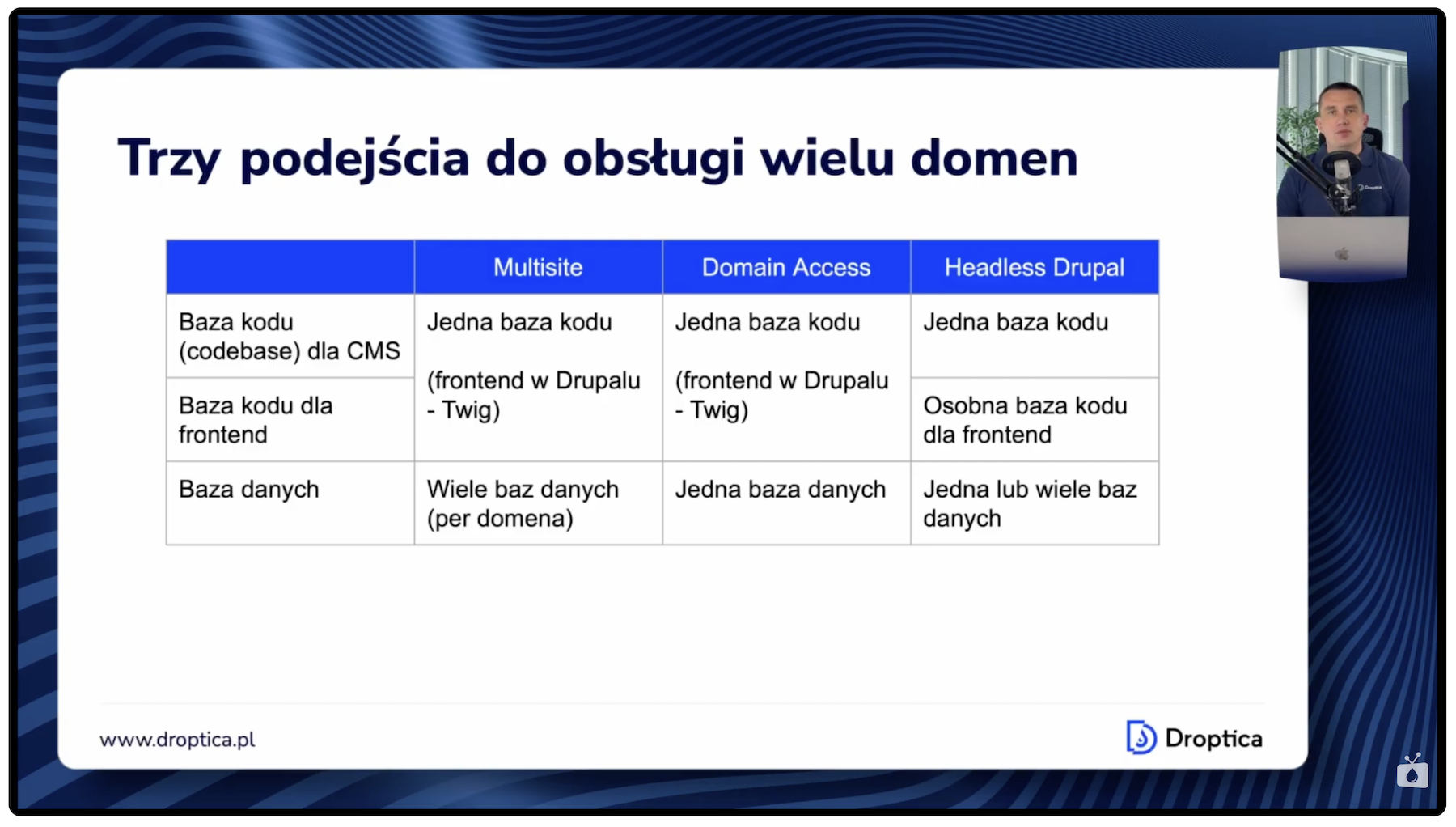
Each of these approaches has its strengths and weaknesses. Below, I discuss them in detail with examples of companies that use them.
Multisite – one codebase, separate databases
Drupal Multisite is a feature built into Drupal core, so it doesn’t require installing any additional modules. In practice, you have one folder with the Drupal code, but for each site you create a separate database and a separate folder in the sites directory.
Each site has its own settings, can use shared modules or have its own installed, and themes can be shared across all domains or assigned to individual sites. The same applies to media files and downloadable files – each instance has its own directory.
Example: Droptica.com website
Droptica uses multisite architecture to serve four domains: droptica.com, droptica.pl, kariera.droptica.pl, and szkolenia.droptica.pl. All four domains run on one codebase, have four separate databases, and are hosted on a single project on the Upsun platform (formerly Platform.sh).
Content on individual domains is separated, but functionality – such as adding new modules or new paragraphs (Droptica uses the Droopler system with the Paragraphs module for content building) – is shared. When a new paragraph is added, it’s immediately available across all domains.
Security updates also don’t require updating four sites separately. A single update is enough, which translates into clear time savings when maintaining these services.
Multisite advantages
Key multisite advantages include easier updates – for both Drupal core and modules. All changes are deployed simultaneously across every domain. You save disk space because Drupal, its modules, and the entire vendor directory (which can take up significant space) exist on the server only once, regardless of the number of domains. Each site can have independent configuration, and full database isolation ensures content separation between domains.
Multisite disadvantages
Among the disadvantages, content sharing is more difficult. Since each domain has its own database, content is not automatically available on other sites. There is an option to share certain database tables through configuration in the settings.php file, which allows sharing selected data between instances in a multisite setup, but this configuration requires extreme caution – it’s a risky approach and generally not recommended.
Another disadvantage is that all sites must use the same version of Drupal and modules – you can’t update one domain without updating the others. Problems with one site can affect the other domains. Server configuration for multisite is also somewhat more demanding than for a single Drupal installation.
Read also: How Drupal Multisite Works under the Hood
Domain Access – one codebase and one database
Domain Access (currently called simply the Domain module) is a Drupal module that enables handling multiple domains within a single installation, sharing both the code and the database. This is the key difference compared to multisite, where each domain had its own database.
The module adds a special field to every content type, so when creating any content you always see an additional field on the form where you mark which domain the content is assigned to. Depending on the settings, this can be an assignment to one domain or to multiple domains at once.
Domain Access use cases
This approach is particularly popular in the pharmaceutical industry and among manufacturers of physical products, where companies often create separate websites for each product. A large portion of the content – such as company information, contact details, or terms of service – is shared across domains. Domain Access enables managing all sites from a single place while customizing the look for a specific product on a given domain.
Domain Access advantages
The biggest advantage is content sharing between domains. You create content once and can publish it across multiple domains simultaneously. The system offers a shared base of users, roles, and permissions, which simplifies access management. Flexible permissions let you define who has access to which content and on which domain – you can have global editors or editors assigned exclusively to a specific domain. You can also use different themes on different domains while maintaining data consistency under the hood in your CMS system.
Domain Access disadvantages
A shared database means less data isolation. Problems can affect all domains at once. System configuration is more complex, and maintenance with a large number of domains (dozens or hundreds) can be challenging.
Special attention should be paid when you want to use other modules that manage content access permissions using Drupal core’s built-in mechanism called Node Access Grants. The Domain Access module relies on this very functionality. If several modules hook into it, conflicts can arise. As a result, content may end up with overly restricted or overly broad access. Sometimes it becomes necessary to write a custom module that reconciles settings from multiple modules using Node Access.
With Domain Access, it’s also important to carefully plan your content structure and taxonomy so the system remains clear and convenient for daily use.
Headless Drupal – backend API with independent frontends
In the headless model, Drupal operates solely as a backend – it delivers content, while the frontend is built using JavaScript technologies such as React, Angular, or Vue. Communication happens through an API, typically JSON API or GraphQL, depending on the planned backend architecture.
Example: Polish Football Association websites
An excellent example of headless architecture in action is the Polish Football Association (PZPN). PZPN uses a single central Drupal system as the content source for multiple websites. This approach enables creating optimized frontends for different audiences and different domains while maintaining content consistency and data structure across the entire ecosystem of PZPN’s web services.
Headless advantages
Headless gives you full flexibility in building frontends for different domains. Each site can have a completely different look and distinct functionality. You can optimize each frontend individually for SEO and performance. Integration with mobile apps becomes natural – since the API already exists, a mobile app connects to the same endpoints as the websites. Frontend and backend teams can work independently, which often accelerates the pace of the entire project’s development.
Headless disadvantages
The biggest disadvantage is the technical complexity that comes from combining multiple technologies. On the backend you have Drupal, on the frontend different JavaScript frameworks, and sometimes even different frameworks on different domains. Team skill requirements are higher – you need specialists in both Drupal and frontend technologies.
Managing multiple code repositories (multiple codebases) is necessary, which increases maintenance costs. Deployments require special care. Frontend changes often need to be synchronized with backend changes, and deploying new versions of both applications must be done in the right order, keeping compatibility in mind.
Comparing the three approaches – multisite, Domain Access, and headless
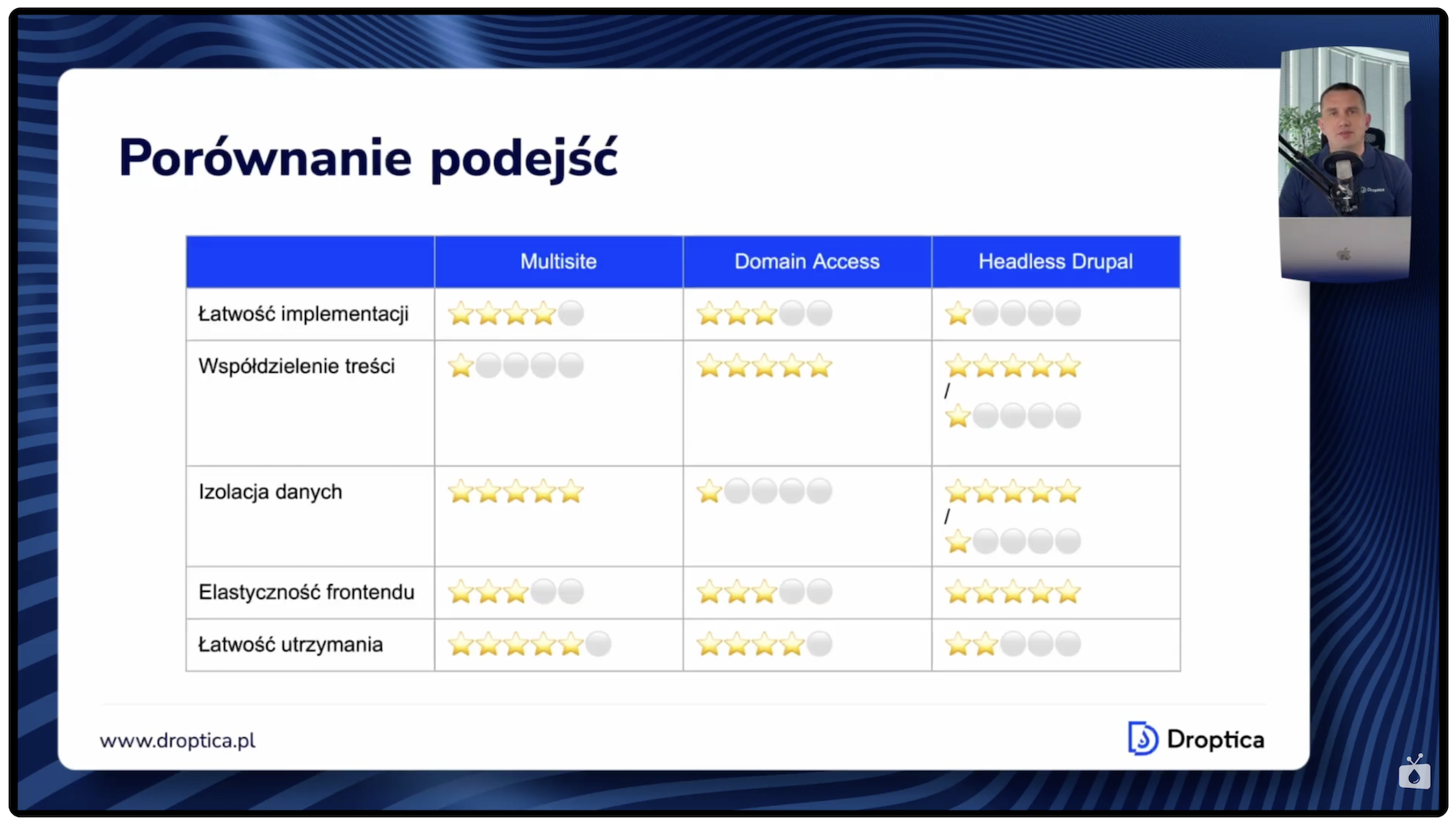
Comparing key parameters helps determine which approach fits a specific situation. Below, I compare multisite, Domain Access, and headless across five key criteria.
Ease of implementation
Multisite is the simplest to set up because it’s built into Drupal core. Domain Access requires somewhat more effort – installing and configuring an additional module, planning content structure and permissions. Headless requires the most effort and the broadest technical knowledge, as it combines several different technologies.
Content sharing
Domain Access clearly leads in this category because it operates on a single database – you create content once and publish it across multiple domains. Multisite offers the least capability here due to separate databases. With headless, it depends on the chosen architecture – you can have one shared database or multiple separate ones, depending on project needs.
Data isolation
The situation is reversed compared to content sharing. Multisite provides the best data separation because each domain has its own database. Domain Access offers the least isolation, and headless – as with sharing – depends on the chosen architecture. Data isolation can be important for security reasons in certain industries and projects.
Frontend flexibility
Headless is unrivaled here and offers virtually unlimited possibilities.
Ease of maintenance
Domain Access provides the highest ease of maintenance because you have one codebase and one database, with everything managed centrally.
When to choose multisite, Domain Access, or headless?
Choosing the right architecture should be based on an analysis of your organization’s specific needs. Below are the scenarios where each of the three approaches works best.
When to choose multisite?
Multisite is the best choice when you need independent sites with a similar structure but different content. A good example is Droptica’s corporate website – the Droopler system, where the data structure is the same across all domains but the content is different and separated. This approach works well when you want easy updates across all sites at once but don’t need advanced content sharing between domains.
When to choose Domain Access?
Domain Access is the right choice when you need intensive content sharing between domains and want a shared user base. With a large number of similar sites, Domain Access can prove to be the most efficient approach.
When to choose headless?
Headless works well when you need very different interfaces and frontends for individual domains, or when you’re planning mobile apps or other content distribution channels. It’s worth considering this approach when your team has experience in frontend technologies and you want to leverage those skills to build optimized interfaces.
Factors affecting the decision
It’s worth looking at several additional factors that can influence your architecture choice. Budget and available resources is one of them – headless requires the biggest investment in both time and expertise. You gain frontend flexibility but spend more time building and maintaining the system because you have multiple codebases and multiple technologies to maintain.
The number and diversity of domains is another factor. Content sharing needs, future development plans, and performance requirements are all elements that should also be considered when making the decision.
It’s worth carefully analyzing these factors on a case-by-case basis, because changing your approach later can be costly and time-consuming.
How to handle multiple domains in Drupal - summary
Each of the approaches discussed has its advantages and disadvantages, and the choice depends on the specific needs of your company or organization. Multisite offers simplicity and data separation. Domain Access excels at content sharing. Headless provides enormous frontend flexibility.
In practice, hybrid setups are common – combining different approaches. For example, you can use Domain Access for the main group of related corporate sites and multisite for more independent services. Another variant is using Domain Access for the main corporate sites and headless for product sites – simple services consisting of a few pages where content is delivered from a central system and the frontend is built separately.
It’s worth carefully planning your architecture and thinking through your choice of approach. Even if the initial decision doesn’t turn out to be optimal, you can change it later – switch from one approach to another or create a hybrid. However, if you think through the architecture from the very beginning, you’ll save time and money.
Need help designing a multi-domain architecture for your case? Our Drupal agency will help you choose and implement the approach that best fits your project goals.