
WordPress vs Drupal – Comparing 5 Key Tools and Their Equivalents

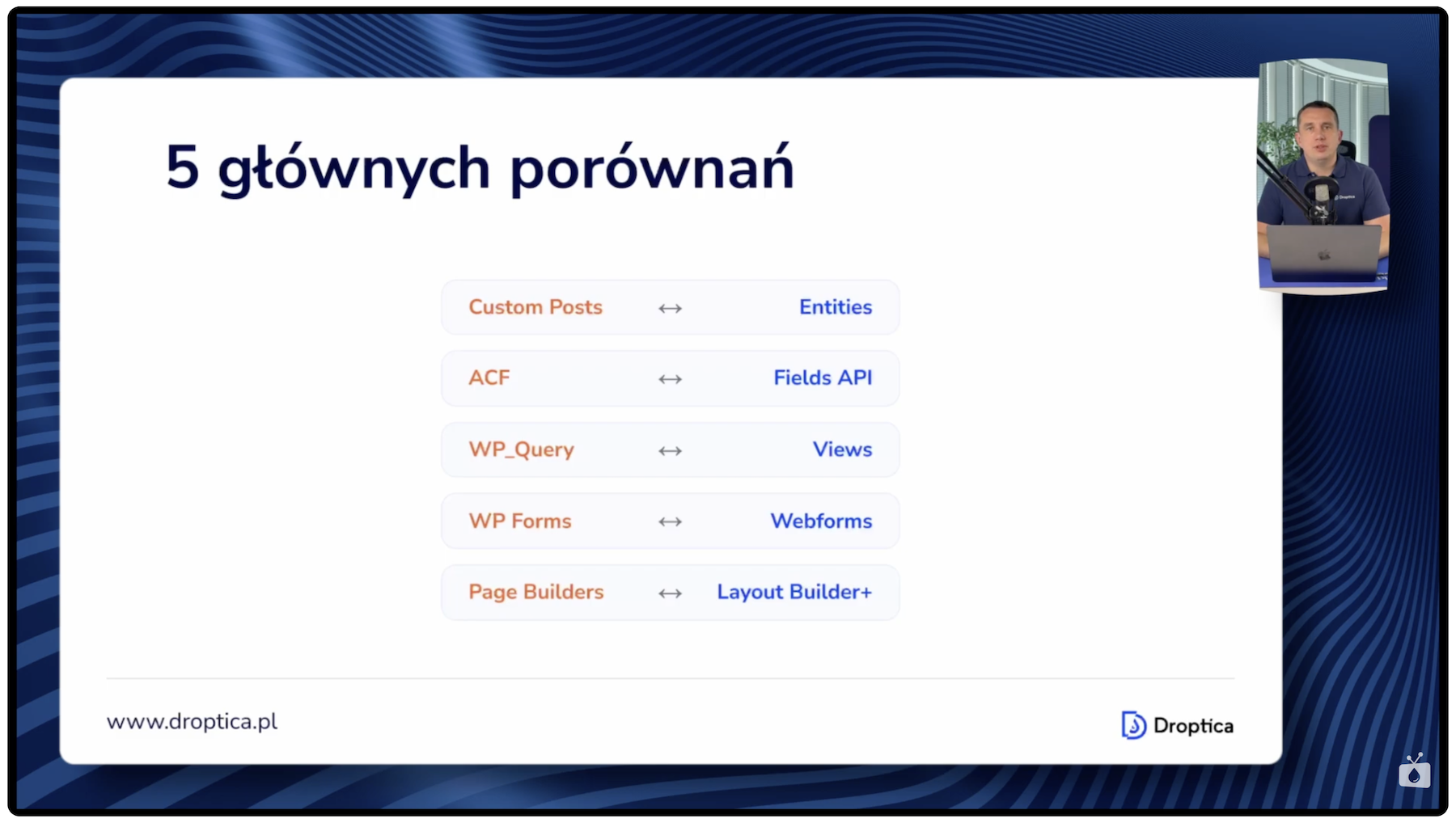
Switching from WordPress to Drupal raises many concerns. Will the migration be too complicated? Will I find equivalents for the tools I use every day? In this article, I compare five of the most important WordPress tools with their Drupal counterparts: Custom Post Types, ACF, WP Query, WP Forms, and Page Builders like Elementor. For each one, I show what working in Drupal looks like with real examples and a live demo in Drupal CMS. After reading this post, you’ll see that Drupal isn’t hard at all, and concepts familiar from WordPress translate to Drupal almost one-to-one. Feel free to read the article or watch the episode from the Nowoczesny Drupal series.
In this article:
- Why consider switching to Drupal?
- Custom Post Types vs entities in Drupal
- ACF vs Fields API – extending content types with custom fields
- WP Query vs the Views module – displaying content lists
- WP Forms vs the Webform module – building forms
- Page Builders – Elementor vs options in Drupal
- Drupal Core, Drupal CMS, and distributions – what to pick to get started?
- WordPress vs Drupal tool comparison – key parameters
- When to choose Drupal and when to choose WordPress?
- WordPress vs Drupal – summary
Why consider switching to Drupal?
Before we dive into detailed comparisons of individual tools, it’s worth answering the question of why you should even consider Drupal as a successor to WordPress. Especially if you plan to develop your website or web application over the next 3 years or more.
First, Drupal is built on modern Symfony components and contemporary PHP libraries. This means better code architecture. In WordPress, you’ll often find PHP files where code is mixed with HTML. Just open the wp-login file to see this problem. In Drupal, the code is cleanly separated: PHP is separate, HTML is separate, and Twig templates are separate. This separation makes it easier to maintain and develop a project in the long run.
Second, security. It’s no coincidence that the European Union, banks, and government institutions choose Drupal. The system undergoes rigorous security audits and is regularly updated to address vulnerabilities. Third, Drupal is a fully open source system – all modules in the official Drupal.org repository are free. This is a significant difference compared to WordPress, where most advanced plugins come with a price tag.
Fourth, Drupal offers much better long-term development capabilities. The system is designed for complex projects that will grow and evolve over the years. And most importantly – if you know WordPress, the transition won’t be difficult because the concepts in both systems are very similar, and Drupal’s interface resembles what you already know.
Read also: How to Migrate WordPress to Drupal? A Step-By-Step Guide
Custom Post Types vs entities in Drupal
The first comparison covers Custom Post Types from WordPress and entities in Drupal. There’s a fairly significant difference in how these two systems think about data. In WordPress, there are Custom Post Types, and essentially the entire content structure relies on them. In Drupal, everything is based on entities, which are divided into two main types: content entities (for storing content) and config entities (for storing configuration).
On the technical side, an entity is a PHP class linked to database tables. In Drupal, you can create many entity types, and each type can have subtypes – internally called bundles. You get several entity types right out of the box with the system core. The User entity stores user data: who can log in, their email, their password. The Node entity is the main entity for storing content, and it’s the one that can have many subtypes – for example, a node of type blog post, page, job offer, listing, or car, depending on the specifics of the website. The File entity stores files and media, Term is used for categories and tags, and Comment handles comments.
The key point is that you can have an unlimited number of Node entity subtypes, and they’re all created in Drupal through the graphical interface – no PHP code required. Moreover, additional modules can introduce their own entity types. For example, after installing the Commerce module, entities like Product, Order, and several others appear. There’s also the ECK (Entity Construction Kit) module, which lets you create entirely new entity types by clicking in Drupal’s admin panel – without programming. These new entities immediately create the appropriate database structures and work with the Fields and Views modules, which I’ll discuss shortly.
What does creating a new content type look like in Drupal CMS?
In Drupal CMS version 1.1.1 (based on Drupal Core 11.1), after navigating to the Content Types section, you can see ready-made Node entity subtypes that come with Drupal CMS. To create a new type, just click the add button and enter a name – in my example, it was “Car.”
After saving, the new type immediately appears in the list. Then, through the Manage Fields tab, you can add fields to it. In the demo, I added a “Car color” field as a select list with options: black, red, white, and others. Drupal automatically generates machine names (identifiers stored in the database) based on labels, though you can also override them manually. After marking the field as required and saving the changes, the form for creating new cars was ready right away.
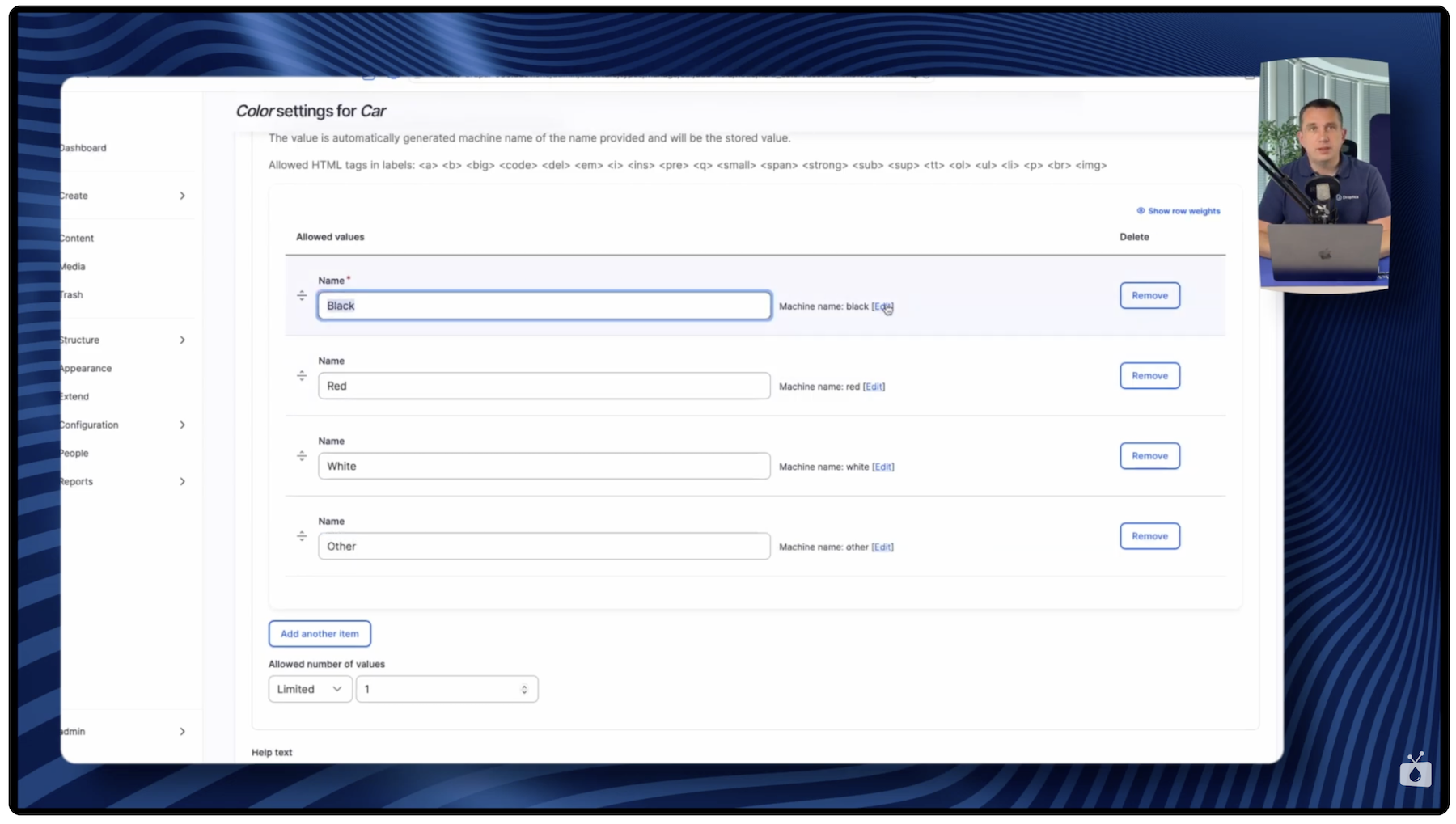
I created test content – “a black BMW” – and after saving, the entry appeared in Drupal’s content list. Importantly, this list can be immediately filtered by content type, for example selecting only “cars.” The entire process from creating a new content type to adding the first entry took literally a few minutes, without writing a single line of code.
ACF vs Fields API – extending content types with custom fields
The second comparison covers ACF (Advanced Custom Fields) from WordPress and Fields API in Drupal. In WordPress, you likely use the ACF plugin to add custom fields to content types. In Drupal, Fields is built directly into the system core, so you don’t need to install any additional modules. Because Fields API is part of the core, it works reliably – it’s developed and tested alongside other built-in Drupal modules.
The interface for adding fields in Drupal looks very similar to ACF. You have access to the same basic field types: text, number, date, file, image, or select list. Exactly like the car example I showed above – navigating to Manage Fields and adding a new field is a matter of a few clicks. There are also modules that extend the list of available field types. For example, the Address Field module adds an address field type, which is useful for projects that require storing location data.
What sets Drupal’s approach apart is the fact that Fields API works directly with entities and the Views module. It’s this connection – everything working together seamlessly – that gives you enormous capabilities for building truly diverse data structures and displaying that data in many ways.
WP Query vs the Views module – displaying content lists
The third comparison covers WP Query and the Views module. In WordPress, when you want to display a custom list of posts of a given type, you need to write PHP code using WP Query. In Drupal, you have the Views module, which is a visual SQL query editor for the database. You do everything through the graphical interface, clicking – without writing a single line of PHP code.
Views is built into Drupal’s core and doesn’t require installing any additional modules. Right away, you have a good selection of output formatting options: display as a table, list, grid, or other layouts. There are also additional modules that extend Views with new formats – for example, a Slider module that lets you present data as an image carousel.
Importantly, Views can be used not only by web developers or site builders. The module is intuitive enough that you can teach editors, marketers, or HR team members to create views, additional reports, and data summaries on their own.
What does creating a view in the Views module look like?
Creating a view takes place in the Structure > Views section in Drupal. On the list, you can see that Drupal itself already uses Views to display its internal pages – for example, the content listing page is also a view built with the Views module, just like the user list page.
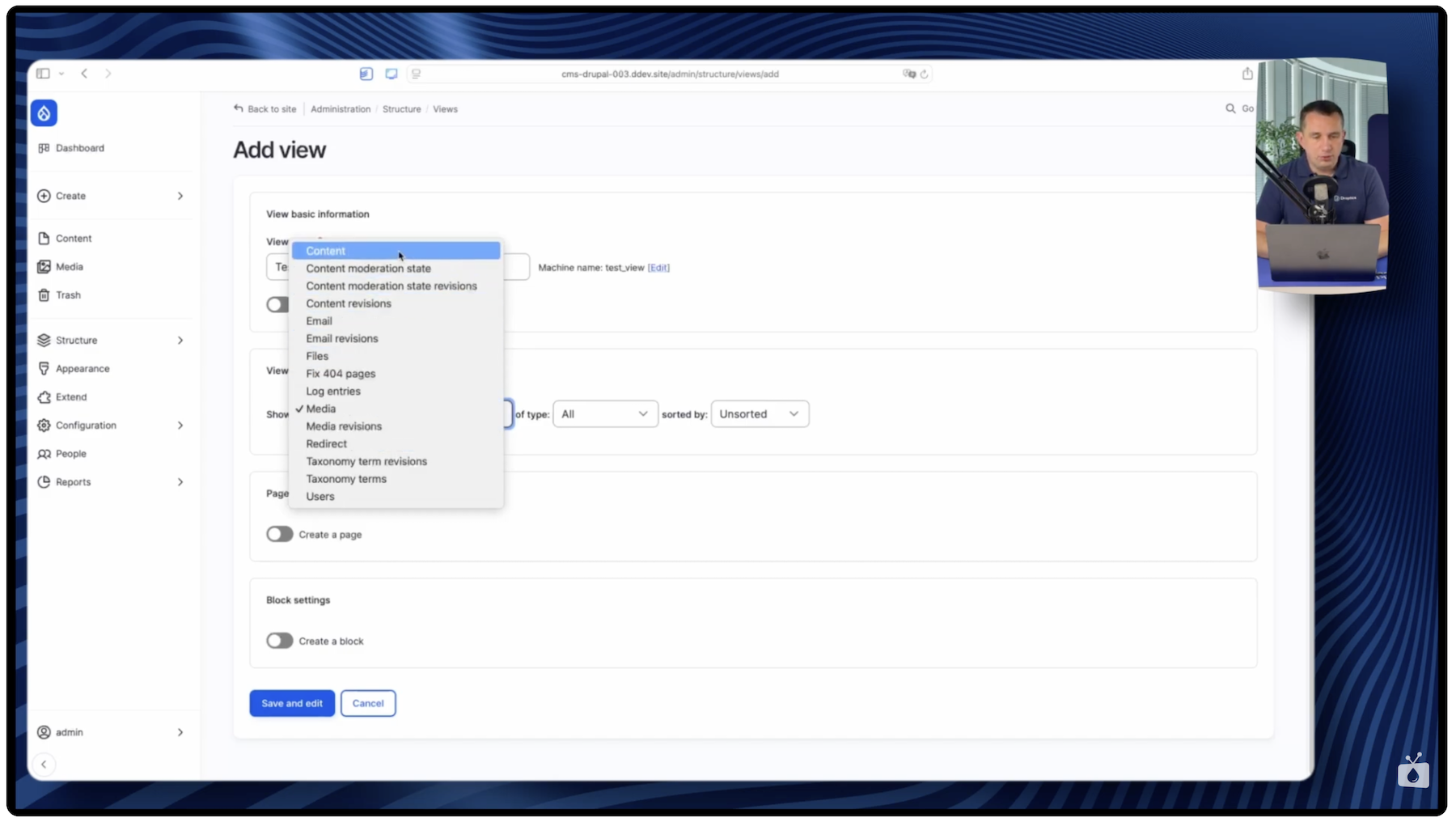
When creating a new view, the first step is choosing an entity. The list offers various options: content (the Node entity), users, media, emails, and other entity types built into Drupal. In my example, I chose content and limited it to the “car” subtype – the entity I created earlier. I set the display as a table on a new page.
Next, I added fields to the view. The Node entity always has a title field that can’t be removed. I also added the color field (car color) and a creation date in short format. At the bottom of the screen, you can immediately see a preview of the results.
The SQL query preview option proved especially useful. In the global Views settings, you can enable displaying the query that the module generates. You can then see exactly what happens behind the scenes: the content type is set to car, the status is 1 (published), and the fields retrieved from the database correspond to the ones selected in the configuration. You can also add relationships – for example, a join to the users table to display information about the content author. Such relationships immediately appear in the SQL query.
After saving the view, I copied the URL path and opened it in the browser. The view displayed with Drupal CMS’s default theme, showing a table of cars. Of course, the appearance depends on the active theme and can be changed freely. From the displayed page, you can also go directly to editing the view and, for example, add new columns or change the display format.
WP Forms vs the Webform module – building forms
The fourth comparison covers form-building tools: WP Forms in WordPress and the Webform module in Drupal. Unlike Fields API or Views, Webform is not built into Drupal’s core – you need to download and install it from Drupal.org. The installation is straightforward and standard, just like any Drupal module.
The interface for building forms in Drupal with the Webform module is very similar to what you know from WordPress. You have a builder with various field types, notification email configuration options, and many additional settings. What sets Webform apart is its range of advanced features. The module offers multi-step forms, advanced input data validation rules, and integrations with external systems.
Webform also has a very extensive permissions system. You can precisely define who can view, edit, or delete submissions sent through forms. On top of that, there’s advanced data export, allowing you to pass collected data to other tools for further processing. The module also offers broad integration possibilities with other Drupal modules, which means forms can become part of larger workflows within the system.
Page Builders – Elementor vs options in Drupal
The fifth comparison covers Page Builders. In WordPress, a popular choice is Elementor. In Drupal, you have as many as five options for building pages, each with different use cases and complexity levels.
CKEditor
CKEditor is an advanced WYSIWYG editor built into Drupal. By default, it can be treated as a standard text editor, but there are plenty of modules that extend it – for example, modules for templates or for inserting various Bootstrap library elements.
Layout Builder
Layout Builder is the second tool built directly into Drupal’s core. It works similarly to popular Page Builders – you drag blocks, arrange sections, customize them, add multi-column sections, and place content in them. Layout Builder also has a good number of additional modules.
Gutenberg for Drupal
If you use Gutenberg in WordPress and feel comfortable with it, here’s good news – Gutenberg is also available for Drupal as an additional module. You can install it and use the familiar block editor directly within the Drupal environment.
Paragraphs
Paragraphs is a modular approach to building content, where each page element is a separate “paragraph” that can be arranged and configured independently. This module is used, among other things, in the Droopler distribution created by Droptica.
Drupal Canvas (formerly Experience Builder)
Experience Builder, now known as Drupal Canvas, is a relatively new tool that is still under active development. It introduces even more advanced page and layout creation capabilities.
Drupal Core, Drupal CMS, and distributions – what to pick to get started?
When you first encounter Drupal, it’s worth understanding three layers on which you can build your project. Each offers a different level of readiness and requires a different amount of configuration.
Drupal Core – the system foundation
Drupal Core is the basic, “raw” system with the most important built-in modules, such as Views and Fields. It requires configuration from scratch.
Drupal CMS – a ready-to-use system
Drupal CMS is a newcomer from early 2025, when version 1.0 was released. It’s the Drupal core expanded with about 100 additional modules that are already configured and ready to work. After installation, you immediately get prepared data types (Node entities), views, module configurations, and plenty of features ready to use. Everything was prepared by Drupal specialists, so the system is ready to go from the first launch. Drupal CMS can be thought of as an official distribution created by the Drupal team.
Distributions – ready-made systems for specific needs
Drupal distributions are even more advanced, complete systems built on Drupal and adapted to specific use cases. For example, Droopler is a distribution created by Droptica for building corporate websites. It includes ready-made content types, Page Builders, visual components, a ready-made frontend theme that looks great right after installation, a media management system, and SEO tools.
Open Intranet is another distribution from Droptica – an internal employee portal featuring news, a document repository, a knowledge base, an employee directory, and many other features. Both distributions are available as open source and ready to use right after installation.
In addition to these two distributions, you’ll find many others on Drupal.org, created by companies from around the world. You can download them for free, test them, and see what ready-made systems Drupal developers and agencies publish. If you know Linux, Drupal distributions can be compared to Linux distributions: there’s the Linux kernel and distributions based on it like Ubuntu, Red Hat, or Fedora. Similarly, in the Drupal world, there’s the system core and distributions built on top of it.
WordPress vs Drupal tool comparison – key parameters
Let’s now compare the tools discussed in terms of several important parameters that may help with the migration decision.
Ease of learning. For people who know WordPress, all the Drupal tools we discussed – entities, Fields API, Views, Webform, or Layout Builder – will feel very similar in terms of concepts and interface. Someone who has worked with WordPress can easily find their way around Drupal.
Built-in functionality. Here, Drupal clearly leads. Fields API, Views, and Layout Builder are part of the system core, so you don’t need to install any additional modules or pay for plugins. In WordPress, ACF, advanced WP Query features, and Page Builders are separate, often paid plugins.
Flexibility and configuration options. Drupal offers significantly more options, which is often useful, especially for large projects.
Ease of maintenance. Drupal has an advantage because more modules are built into the core. You don’t have to worry about maintaining additional plugins or modules, or about compatibility between them.
Initial simplicity. This is the only area where WordPress may have an advantage. Fewer options at the start means someone can get up to speed more quickly. But that’s exactly why Drupal CMS was created – so those options are already prepared and configured right after installation, which significantly eases the entry into the Drupal world.
When to choose Drupal and when to choose WordPress?
Drupal will be the better choice when you need advanced data structures and relationships between content. It will also work well when you’re planning a scalable project with multiple user types and a complex permissions system. It’s a good approach when you’d rather have more features built into the system itself, instead of relying on dozens of external plugins. Drupal is also the better choice for projects where security and stability matter. That’s exactly why it’s chosen by banks, government organizations, and the European Union.
On the other hand, WordPress may work better if you have a very simple blog or a small brochure site consisting of a few pages that doesn’t require advanced features. It’s also a great option when you know you won’t be expanding the site in the future – you’ll set it up and forget about it.
Importantly, both systems run on the same hosting technology: PHP and MariaDB database. Switching from one system to the other doesn’t require changing your server infrastructure.
WordPress vs Drupal – summary
If you know WordPress, switching to Drupal won’t be as hard as you might think. The concepts in both systems are very similar: Custom Post Types correspond to entities (with far greater capabilities), ACF has its equivalent in Fields API built into the core, WP Query is replaced by the visual Views module, WP Forms corresponds to the Webform module, and Elementor can be replaced by one of five options – CKEditor, Layout Builder, Gutenberg, the Paragraphs module, or Drupal Canvas.
Drupal’s key advantage is that most of these tools are built into the system core. You don’t need to install separate paid plugins, and the entire ecosystem is tested and developed as a cohesive whole. This is why Drupal works especially well for projects that will grow over the years. And by starting with Drupal CMS, you get a system that’s ready to use from day one.
If you’re considering switching from WordPress to Drupal or need support with the process, feel free to reach out. Our team of experts at the Drupal agency will help you carry out the migration and leverage the full potential of Drupal for your project.