8 Key Matters to Consider While Planning an Intranet for Your Company


Planning a new intranet requires a strategic approach and consideration of many factors – from the needs of different departments, through technical aspects, to a long-term and clear vision for development. A well-planned intranet site increases productivity and improves information flow. A poorly prepared project may end up as a tool that employees ignore. In this article, I will discuss key intranet planning issues—both strategic and practical—that will help you avoid pitfalls and build a system that truly serves your organization.
In this article:
- 1. Define business goals and success metrics of your intranet project
- 2. Examine the requirements in all departments
- 3. Define the intranet content management model and the role of editors
- 4. Choose the right intranet solution
- 5. Plan the information architecture and navigation
- 6. Plan integrations very carefully
- 7. Design the user experience (UX)
- 8. Budget and schedule
- Intranet planning – summary
1. Define business goals and success metrics of your intranet project
Before you start working on your intranet, you need to know why you are building it and how you will measure its effectiveness. Without clear goals, it is easy to create a system with many features that does not solve any specific problem.
Why does the company need an intranet?
Conduct a brief analysis of the current situation – talk to representatives of various departments, ask them about their biggest frustrations related to internal communications and access to information. Understanding where the "pain points" are in everyday work will allow you to define realistic goals for the new platform.
The most common reasons for intranet implementation are:
- Improving internal communication. Important information gets lost in emails, and announcements don't reach everyone. As a central communication hub, the intranet ensures that everyone has access to the latest news in one predictable place.
- Centralization of company knowledge. Documents are often scattered across different systems – Google Drive, SharePoint, and local servers. The intranet is a single place for all organizational knowledge with a clear structure and search engine.
- Process automation. Vacation requests, business trips, orders – instead of printing forms and collecting signatures, employees can take care of things online in a matter of minutes.
- Streamlined onboarding. New employees often feel lost. An intranet with checklists, instructional videos, and FAQs reduces the onboarding time from weeks to days.
- Building organizational culture. Particularly important in dispersed organizations, the intranet can serve as a platform where teams share successes and foster a sense of community.
Key performance indicators (KPIs)
Once you have defined your goals, decide how you will measure the effectiveness of the intranet. Monitoring specific indicators will allow you to assess whether the system is fulfilling its purpose and where improvements are needed.
- Number of active intranet users. How many employees use the intranet daily or monthly? If the majority do not visit the system regularly, something is not working as it should.
- Most popular sections and search terms. Analysis shows what is important to employees and what content may be difficult to find or does not exist.
- Reduction in repetitive queries. If IT, HR, or administration departments receive fewer questions such as "How do I request vacation time?", the intranet is working.
- Time to find information. Measure the time it takes employees to find specific information. After the intranet implementation, the time should be significantly reduced.
- Level of user engagement. Comments, likes, shares – the more interaction, the better. The intranet is a living communication tool, not just a bulletin board.
- Satisfaction rate. Quarterly surveys: "How would you rate the usefulness of the intranet on a scale of 1-10?" will show how perceptions of the system are changing.
How to formulate goals?
The most common mistake is to formulate goals that are too vague. "Improve communication" or "facilitate access to information" sound good, but they cannot be verified. A good business goal must be specific, measurable, and time-bound.
Examples of well-formulated goals:
- "Reduce the number of employees unaware of key company announcements by 50% within 6 months of launching the intranet (measured by a quarterly survey)."
- "Reduce the average time to find company procedures from 15 to 3 minutes within the first 3 months of the intranet's operation."
- "Reduce the number of requests for basic information to the HR department by 40% within six months."
You can measure these goals later and clearly determine whether the intranet project was successful. Set them before the project starts and monitor them regularly after the intranet launch.
2. Examine the requirements in all departments
The intranet is a tool for the entire organization, not just for the communications or HR department. Therefore, it is crucial to gather requirements from representatives of all departments – from sales, through IT, to administration. Each department has different needs and pain points, and understanding them will allow you to build a system that is truly useful for everyone.
Conduct interviews with representatives from each department
It is best to talk to people who deal with organizational or communication issues on a daily basis. You can use a combination of methods:
- individual interviews – they allow for a deeper understanding of the specific needs of the department,
- group workshops – reveal systemic problems and help develop common solutions,
- online surveys – for larger organizations to gather a broader perspective.
Ask specific questions: "What takes up too much of your time?", "What information is difficult to find?", "What would you like to have in one place?".
Identify key communication and organizational issues
During interviews and workshops, focus on specific problems that teams face on a daily basis. Below are the most common issues and how the intranet can solve them.
Inability to communicate effectively with employees
Important announcements get lost in emails, not everyone receives or reads them. Each department publishes information elsewhere – Teams, bulletin boards, shared drives. Employees often struggle to find up-to-date information.
Solution: The intranet can serve as a central place for publishing company news, management announcements, and departmental communications – with notifications and targeting of specific employee groups. It can also include a unified publishing system with a clear category structure, an archive of entries, and a search function.
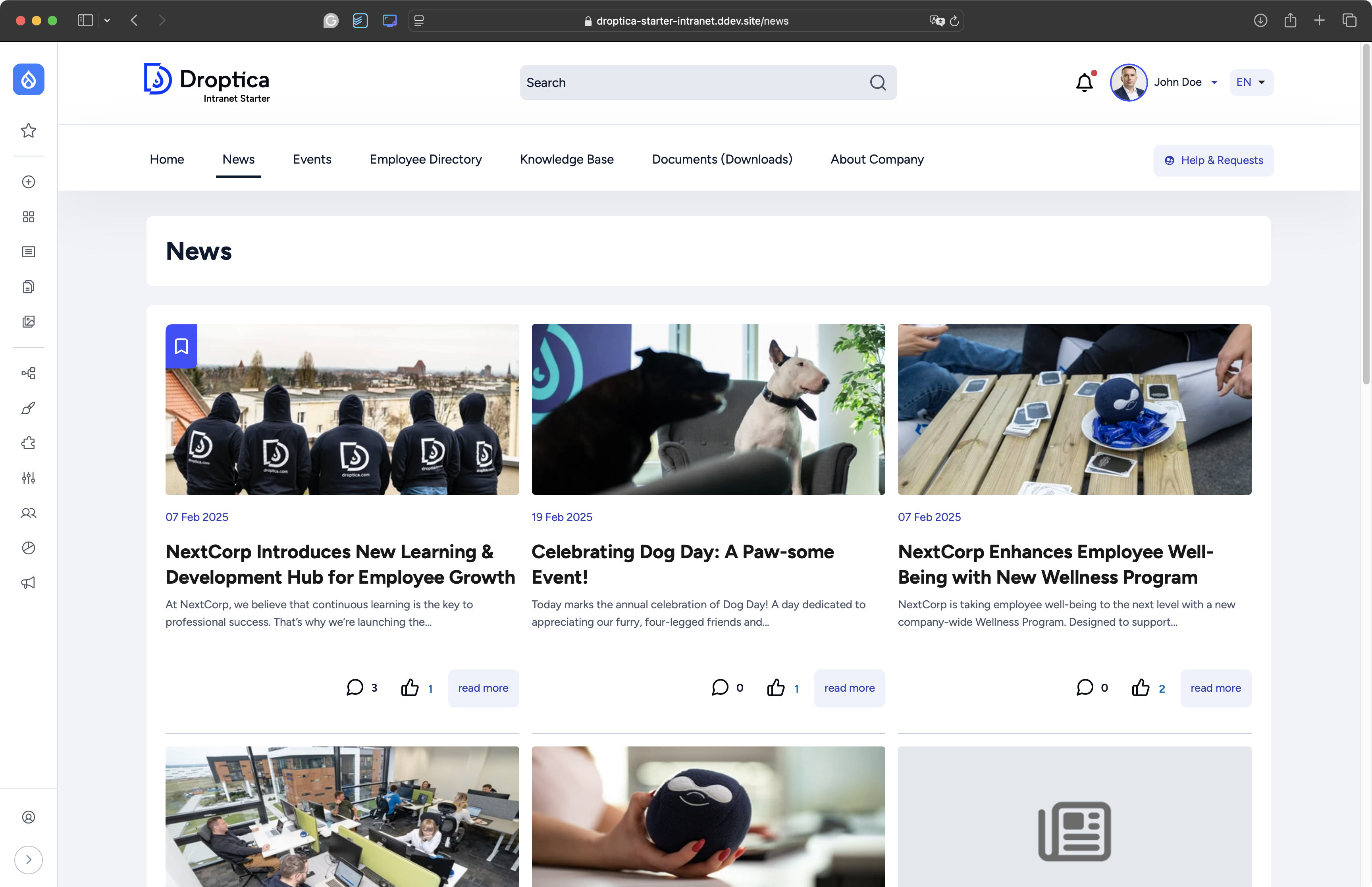
The company news section in the Open Intranet system.
The need for dashboards and navigation panels
Departments create reports and dashboards in Excel or BI, but have nowhere to share them with their teams.
Solution: Department pages on the intranet can feature embedded dashboards that update automatically and are accessible to authorized personnel 24/7.
Documentation scattered across different systems
Company procedures are stored on Google Drive, templates are located in SharePoint, instructions are available in Teams, and policies are communicated via email. It takes 15 minutes to find a specific document.
Solution: A central document repository with a clear folder structure, tagging, search engine, and version control – one system for all company knowledge.
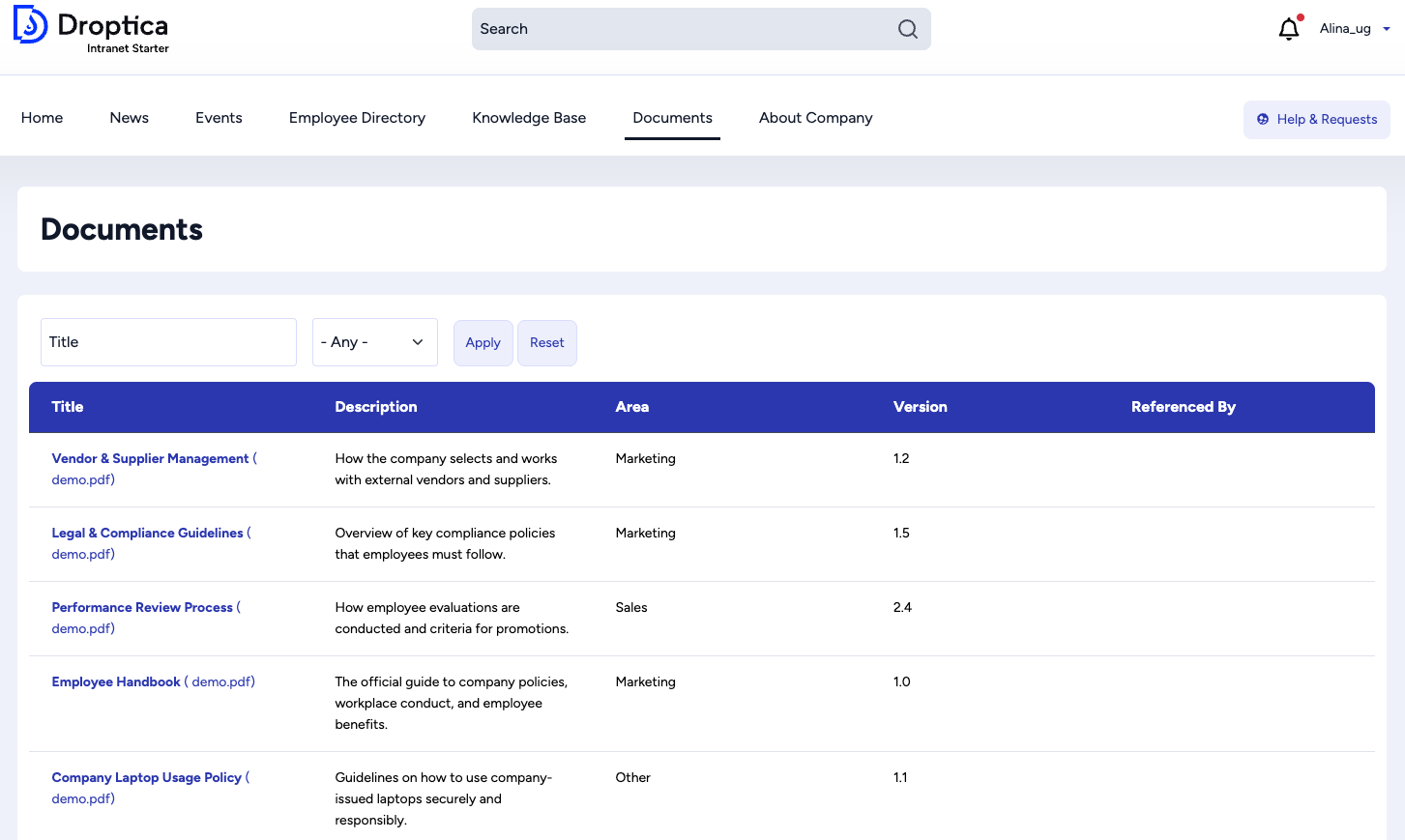
Document management on the Open Intranet platform.
Difficulties in onboarding new employees
New employees ask dozens of the same questions, don't know who to turn to, and get lost in procedures. Onboarding takes weeks.
Solution: A dedicated onboarding section with checklists, instructional videos, an employee directory, FAQs, and an office map – all in one place, available from day one.
Prioritize features based on business value and ease of implementation
After gathering requirements, you will probably have a long list. Use a prioritization matrix:
- Quick wins. Start with solutions that are easy to implement and will bring high value.
Examples: employee directory, FAQ, template repository, company calendar.
- Key functionalities. For the first phase of the project, also plan solutions that are more difficult to implement but have high business value.
Examples: integration with the HR system, automation of requests, and an advanced search engine.
- Nice to have. These are useful but not critical solutions, so plan them for later in your intranet roadmap.
Examples: social module, integration games, and advanced analytics.
- Low priority. These are features of little value or very difficult to implement. It is better to postpone or reject them.
Examples: advanced gamification system with rankings and rewards, proprietary messenger (when the company already uses Teams/Slack).
Document and manage expectations
You will not be able to fulfill all wishes. Be transparent – explain why some features will not be included in the first version but may be added later. Make a list of requirements with priorities and share it with key stakeholders. This will serve as a reference point throughout the intranet project and a basis for planning the next phases of development. Showing that you have listened to and considered the proposals builds trust and commitment among the teams.
3. Define the intranet content management model and the role of editors
Even the best-designed intranet will not work without a clearly defined content management model. You need to decide who will be responsible for publishing intranet content, what the approval process will look like, and what guidelines editors will follow.
Who will be responsible for publishing content?
There are several content management models:
- centralized model – one person or a small team (e.g., the communications department) is responsible for all publications on the intranet, while other departments send them materials for publication
- decentralized model – each department has its own editors who independently publish content in their sections of the intranet,
- hybrid model (most often recommended) – company-wide news and management announcements are published by the communications team. Individual departments have their own editors for specialized intranet content in their sections.
Which departments will have publishing rights?
Determine which departments need editorial rights and in which sections:
- communication/marketing – company news, management announcements, events,
- HR – job offers, benefits, policies, onboarding,
- IT – technical instructions, problem reports, IT FAQ,
- administration – room reservations, parking, catering,
- specialized departments – their own sections with specialized knowledge.
Not every department needs to have access rights right away – start with those that have the most to communicate.
4. Choose the right intranet solution
The decision about the technology on which you will build your intranet is one of the key steps in planning. Your choice affects costs, implementation time, flexibility, and long-term system development opportunities.
SaaS solutions
Systems are available immediately on a monthly subscription basis. You can launch your intranet in days or weeks, pay per user, and the provider takes care of the infrastructure and updates. This is the fastest way to get an intranet up and running, but with limited customization options for specific business processes. This solution is suitable for small businesses that need basic functionality without involving an IT team.
Creating an intranet from scratch
An intranet designed and built specifically for your organization. Everything can be exactly as you want it – the interface, functions, and integrations. This solution gives you full control and ownership, but comes with the highest costs and longest implementation time. This is an option for large companies with complex, unique requirements that treat the intranet as a strategic tool and have the appropriate budget.
Open source solutions
You use proven foundations (e.g., Drupal, WordPress), but you can customize the system to your intranet needs. You don't pay for per-user licenses, you retain control over your data, and you can develop functionality over time. This solution requires technical expertise, but offers the best value for money for medium-sized organizations.
Key selection criteria
There is no universal answer as to which intranet software is best – it all depends on the context of your organization. Instead of choosing based on opinions or market trends, evaluate each option through the lens of four key criteria that will realistically influence the success of the intranet implementation.
1. Budget and financing model
Do you prefer a low entry point with monthly fees that grow with your company? Or is it better to invest more at the beginning, without fixed costs later? SaaS solutions have predictable operating expenses. Open source or dedicated systems involve a larger initial investment, but without increasing user fees.
2. Technical resources within the company
Do you have a competent IT department? You may want to consider a solution that requires technical management. Don't have a technical team? A SaaS system with full intranet vendor support will be a safer choice. You can also opt for an open source tool and outsource its development and maintenance to an external agency.
3. Specificity of business requirements
If your company has standard communication and collaboration needs, a ready-made SaaS solution or an open source system with basic configuration will probably suffice. If your organization has unique processes, industry requirements, and advanced workflows, opt for a dedicated system or open source solution that can be customized to your specific needs.
4. Security requirements and compliance
In regulated industries (finance, healthcare, public administration), full control over data may be a legal requirement. In such cases, self-hosting and code transparency become essential. If your company is ISO 27001 certified or subject to GDPR with high data processing risk, the ability to audit security and full control over the infrastructure may be decisive factors.
A practical approach to decision-making
Instead of choosing a solution based on theoretical advantages, test the actual options. Most providers offer trial periods or demos during intranet consultations. Invite a group of employees from different departments, give them typical tasks to perform, and observe how they cope with the interface.
Prepare a list of the 10 most important features and processes that the intranet must support. Check how each solution handles them—not in theory, but in practice during testing.
Also consider the 3-5 year perspective. Will the chosen solution be scalable as the company grows? Will you be able to add new functionalities when new needs arise? The cheapest option today may turn out to be the most expensive in the long run if it forces you to migrate to another system in two years.
5. Plan the information architecture and navigation
A well-designed information architecture is the foundation of a useful intranet. If employees can't find what they're looking for quickly, they'll stop using it—no matter how valuable the content you publish is.
Menu structure and content categories
Start by defining the main sections of the intranet. The structure should reflect the needs of users, not the organizational structure of the company.
Example main menu structure:
- News – news, announcements,
- For employees – HR, benefits, vacations, onboarding,
- Knowledge – procedures, documents, templates, FAQ,
- Tools – links to systems, forms, reservations,
- About the company – mission, values, structure, history,
- Departments – sections for individual departments.
A good menu should have a maximum of 5-7 main categories – more than that overwhelms users. Use clear and understandable names, without jargon. Group similar content together and maintain a flat structure – a maximum of 2-3 nesting levels.
Search and tagging strategy
Even with the best navigation, employees will use the search engine – make sure it works effectively. The search engine should search titles, content, and downloads, suggest phrases as you type (autocomplete), show relevant results at the top, and allow you to filter results by department, date, or content type.
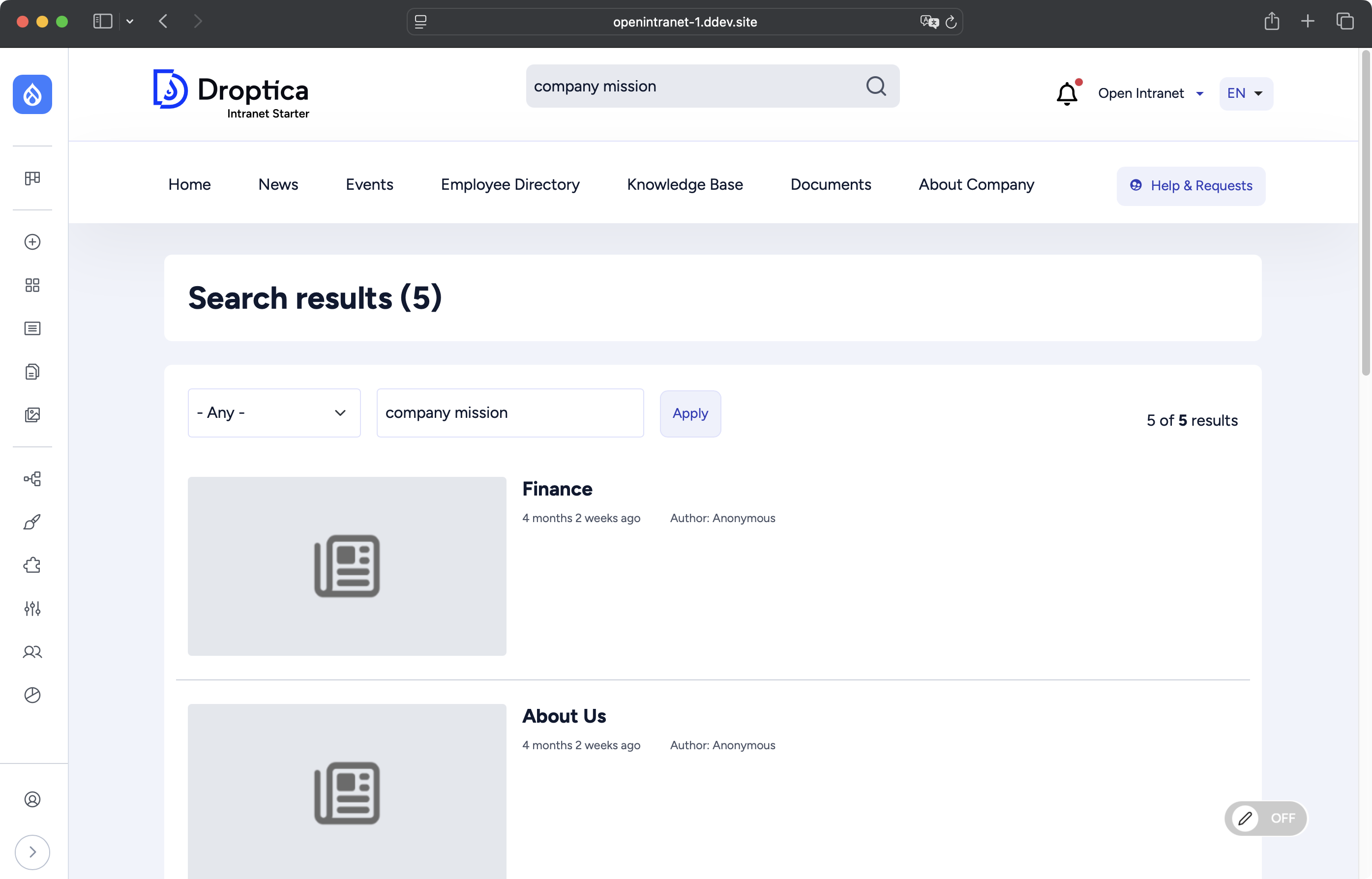
Open Intranet includes a search engine that allows you to easily filter results by category.
The tagging system is also important. Each piece of intranet content should have tags describing its content – use consistent tags from a list of approved keywords.
Personalization of content for different user groups
Not every employee needs to see everything. Personalizing the intranet increases its usability. You can personalize content by:
- department – a developer sees IT news, a salesperson sees sales news,
- location – an employee in Madrid sees information about the Madrid office,
- position – a manager sees additional sections,
- interests – users choose which sections they are interested in.
Personalization can apply to the home page (different widgets for different groups), the menu (showing or hiding sections according to permissions), or news (filtering according to preferences).
Home page – what should be on it?
The home page is the most frequently visited place on the intranet. Below, you will find elements worth including.
- Latest news and announcements – 3-5 most recent posts with the option to view all. This is the main reason why employees visit the intranet every day.
- Quick links – the most frequently used tools and systems in one place: HR systems, CRM, help desk, calendar, and reservations. They save time and clicks.
- Search engine – visible in the center or at the top of the page. Many users search first instead of browsing the menu.
- Upcoming events – a calendar with the nearest dates of training sessions, company meetings, and other events.
- Shortcuts to popular documents – most frequently downloaded templates, procedures, FAQs.
The home page should be clear and not overwhelming. It is better to include fewer elements, but ones that are well designed.
6. Plan integrations very carefully
An intranet platform rarely works in isolation. Its true value is revealed when the intranet is integrated with other company tools. Poorly planned integrations are one of the most common causes of delays and budget overruns in intranet projects.
Inventory of systems for integration
Start by creating a list of all the systems with which the intranet should communicate. The most common integrations are:
- Active Directory / LDAP – login and user management. Employees log in with the same credentials as for other company systems, and their data (first name, last name, department, position) is automatically synchronized.
- HR system – employee data, vacations, organizational structure. The employee directory is updated automatically, and vacation requests are sent to the HR system.
- Communication tools – MS Teams, Slack. Notifications from the intranet are sent to communication channels where employees spend most of their time.
- Document management systems – SharePoint, Google Drive. Documents stored in existing systems are displayed on the intranet without the need for migration.
- Project management tools – Jira, Asana, Monday. Project dashboards and task statuses are visible on the intranet to the relevant teams.
- Calendars and booking systems – Outlook, Google Calendar, and room booking systems. Company events are synchronized with employee calendars, and room bookings are available from the intranet.
Make sure the software you choose supports the necessary integrations
Before choosing an intranet platform, check if it offers ready-made integrations with your systems. Questions for the provider:
- Does the platform have ready-made integration modules for our systems?
- Does the integration require additional licensing?
- How does data synchronization work – in real time or periodically?
- Is the integration bidirectional (read and write) or only unidirectional?
- What data will be synchronized and how often?
- Are there any technical restrictions or API limits?
If the intranet does not have ready integration with the selected system, assess the cost and time of creating a dedicated one. Keep in mind that this can significantly affect your budget and schedule.
API and future expansion possibilities
Not all integrations will be needed from day one. Make sure that the selected platform has an open API that will allow you to add new integrations in the future without having to change the entire system.
Check the API documentation – is it complete, up-to-date, and understandable? Are there implementation examples? Is the developer community active? These are signs that expansion will be possible, and you will not be dependent on just one provider.
7. Design the user experience (UX)
Even the most functional intranet will not be used if it isn’t user-friendly and is visually unpleasant. Good UX (user experience) is an investment that pays off in the form of higher employee engagement and more effective work.
Simplicity and intuitive navigation
Employees should not have to wonder where to find the information they need. Navigation must be obvious and predictable. The menu should always be visible and in the same place on every page. Use standard conventions – the logo in the upper left corner leads to the home page, the search engine at the top, the main menu in the header or side panel.
Breadcrumbs show the user where they are in the intranet structure and allow them to quickly return to the previous level. Key functions and the most frequently used sections should be accessible within 2-3 clicks from the home page.
Responsiveness and mobile accessibility
More and more employees are using the intranet on smartphones and tablets, especially those working remotely, in the field, or in a hybrid mode. The intranet must work smoothly on all devices. Responsive design automatically adjusts the layout of the page to the screen size. The menu transforms into a hamburger menu on a mobile device, columns are arranged vertically, and buttons become large enough to click with a finger.
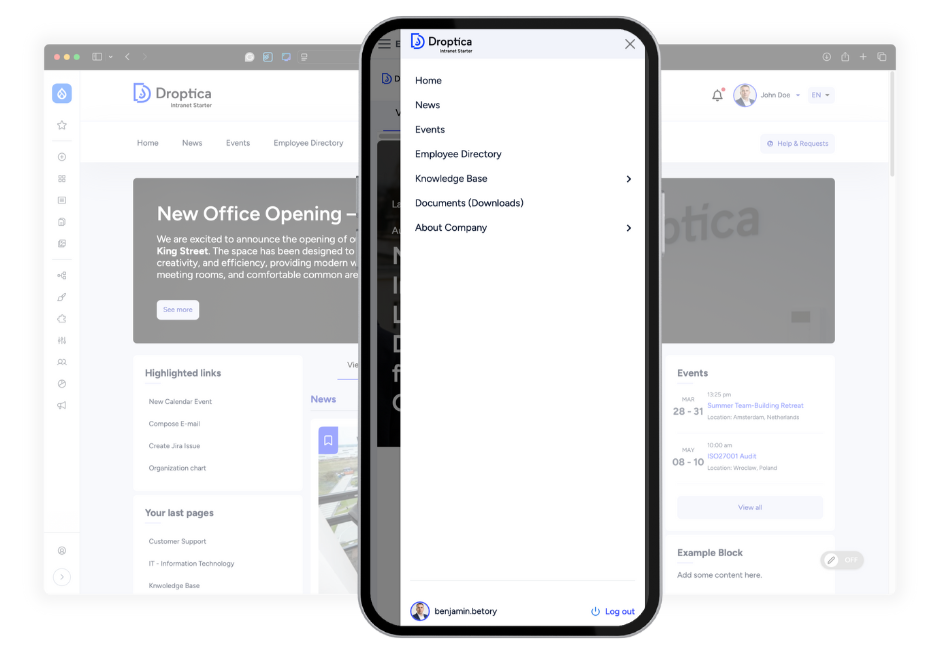
Thanks to its responsive design, Open Intranet displays perfectly on mobile devices.
Accessibility for all employees
The intranet should be accessible to all employees, including those with disabilities. This is not only a matter of ethics, but often also a legal requirement.
- adequate contrast between text and background (legible for people with visual impairments),
- ability to navigate with a keyboard without a mouse,
- alternative descriptions for graphics (for screen readers),
- legible fonts and the ability to enlarge text without losing functionality.
Intranet design consistent with the company's visual identity
The intranet is part of the brand ecosystem – it should visually refer to the company's visual identity. Use company colors, fonts, and graphic style. However, do not blindly copy the company website – the intranet has different goals and users. It can be less marketing-oriented and more functional, but it should retain the brand's DNA.
8. Budget and schedule
Realistic budget and schedule planning is the key to a successful intranet project. Underestimating costs or time can lead to frustration, quality compromises, and a loss of stakeholder trust.
A realistic intranet implementation schedule with a time buffer
Typical on-premise intranet solutions take 3 to 6 months from concept to launch, depending on the complexity of the system.
The basic phases of the intranet project are:
- discovery and planning (interviews, requirements analysis, platform selection),
- design and information architecture (UX/UI design, menu structure),
- development and configuration (functionality implementation, integrations, content migration),
- testing and corrections (functional, integration, usability testing),
- content preparation and training (initial content, training for editors),
- launch and stabilization (soft launch, monitoring, quick fixes).
A 20-30% time buffer should be added to this plan for unforeseen delays – integration issues, changes in requirements, delays in approvals.
Faster launch with an open source intranet
The Open Intranet system allows you to implement the basic version of the intranet yourself. If your company needs additional functionality, integration, or data migration, our specialists at Droptica will customize the software to your specific requirements. This means that your organization does not have to wait several months for the system. The software is quickly available, and your company can compile a list of requirements for expansion while using the intranet on a daily basis.
A budget covering all costs
The intranet budget is not just the cost of the software license (in the case of open source systems, there is no such fee). Take all components into account:
- Development and implementation – the cost of the platform, UX/UI design, configuration and customization, and data migration. If you use an external provider, include the cost of the team's working hours.
- Integrations – each integration is an additional cost during development and potentially in API licenses. Some systems charge for API access or have call limits that require paid plans.
- Training – training for editors and end users, training materials (videos, documentation), internal trainer time, or the cost of external training.
- Maintenance and support (minimum first 12 months) – hosting and infrastructure, security and functional updates, technical support, monitoring, and administration. Typical maintenance costs are 15-25% of the annual implementation cost.
- Budget for improvements after launch – reserve 10-20% of the budget for improvements and corrections in the first 6-12 months. Feedback from users will reveal needs that you did not anticipate during the planning stage.
Intranet planning – summary
Planning an intranet is a process that requires consideration of many perspectives – from business strategy and user needs to technical issues and security. The key to intranet success is not only good preparation at the planning stage, but also flexibility and a willingness to continuously improve the system after its launch.
Remember that an intranet is not a one-off project, but a long-term investment in your organization's communication and efficiency. The more time you spend on careful planning, the greater the chance that you will create a tool that your employees will actually want to use. Our specialists can help you plan, implement, and develop your intranet.
***
Updated article dated 06/08/2020