
Extracting structured metadata from legal documents is one of the most challenging AI tasks in regulated industries. Through careful prompt engineering with GPT-4o-mini and OpenAI’s Structured Outputs, teams can achieve 95%+ accuracy in categorizing complex regulatory documents across multiple taxonomies. This technical guide reveals how BetterRegulation built production-grade prompt templates that reliably extract document types, organizations, subject areas, and legal obligations from UK/Ireland legal texts – reducing manual correction time from 15 minutes to 3 minutes per document.
In this article:
- The challenge: structured data extraction from unstructured legal text
- Why are legal documents so hard to process with AI?
- How does taxonomy injection improve extraction accuracy?
- How to enforce consistent output with JSON schema?
- How does semantic matching work for entity references?
- How to optimize prompts for better accuracy?
- How to extract legal obligations from documents?
- Code examples and prompt templates
- Prompt engineering for data extraction – conclusion
- Need expert prompt engineering for your AI project?
The challenge: structured data extraction from unstructured legal text
Legal documents are treasure troves of structured information buried in dense, complex prose:
"The Financial Conduct Authority hereby issues this guidance pursuant to Section 139A of the Financial Services and Markets Act 2000, as amended by the Financial Services Act 2012, effective from 1 January 2024, applicable to all consumer credit lenders and hirers operating under Part II of the Consumer Credit Act 1974..."
Hidden in this single sentence:
- Document type: Guidance Note
- Organization: Financial Conduct Authority
- Legislation: Financial Services and Markets Act 2000
- Year: 2024
- Affected parties: consumer credit lenders and hirers
A human lawyer extracts this instantly. An AI needs careful instruction—that’s where prompt engineering comes in.
This article shows you how to write prompts that reliably extract structured data from legal documents, achieving 95%+ accuracy in production.
Why are legal documents so hard to process with AI?
Before diving into solutions, it’s essential to understand the specific challenges that make legal document extraction difficult. Legal texts present unique obstacles that standard text processing approaches fail to handle effectively.
1. Complex language
Legal writing uses:
- Archaic terms – “herein,” “whereas,” “aforementioned”
- Nested clauses – sentences spanning paragraphs
- Technical jargon – “force majeure,” “res ipsa loquitur”
- Ambiguous references – “the aforementioned statute” (which one?)
2. Multiple taxonomies
A single document might need categorization across:
- Document type (statute, regulation, guidance, case law)
- Organization (issuing authority)
- Subject area (banking, data protection, employment)
- Jurisdiction (UK, EU, specific countries)
- Legislation (which acts/regulations apply)
- Year, effective date, amendment history
Each taxonomy has 10-400 terms. That’s hundreds of possible classifications.
3. Variable formats
No two legal documents structure information the same way:
Statute:
Banking Act 2023
An Act to regulate...
Enacted by Parliament: 15 March 2023
Guidance Note:
FCA Guidance Consultation Paper CP23/15
Published: December 2023
For: Banks and building societies
Case Law:
Regina v. Financial Conduct Authority [2023] UKSC 42
Supreme Court, 8 November 2023
Same information (type, org, date) in completely different formats.
4. Implicit vs explicit information
Sometimes information is stated directly:
> “This regulation applies to all consumer credit lenders…”
Other times it’s implied:
> “Under Part II of the Consumer Credit Act…” (implies: affects credit lenders)
AI must infer from context.
How does taxonomy injection improve extraction accuracy?
The foundation of accurate extraction: Tell AI about your taxonomies upfront.
Including complete taxonomy lists in context
Instead of: “Categorize this document by type, organization, and area.”
Do: “Match this document to these exact taxonomies:”
### DOCUMENT TYPE TAXONOMY:
- Statute
- Regulation
- Guidance Note
- Code of Practice
- Case Law

### ORGANIZATION TAXONOMY:
- Financial Conduct Authority
- Bank of England
- Competition and Markets Authority
- Information Commissioner's Office
[... complete list ...]

### DOCUMENT AREA TAXONOMY:
- Banking and Finance
  - Consumer Credit
  - Banking Regulation
- Data Protection
[... complete list ...]
Why this works:
- Clear boundaries – AI knows exactly what options exist
- Semantic matching – AI understands “FCA” = “Financial Conduct Authority”
- Returns taxonomy names – AI returns term names (e.g.,
["Data Protection", "Financial Services", "GDPR"]), which the system then maps to term IDs through Drupal’s taxonomy lookup - No hallucinations – AI won’t invent categories
How it works:
AI returns taxonomy term names:
["Data Protection", "Financial Services", "GDPR"]Drupal system performs taxonomy lookup: - “Data Protection” → finds term ID: 42 - “Financial Services” → finds term ID: 87 - “GDPR” → finds term ID: 156
Document is assigned: [42, 87, 156]
This approach leverages AI’s semantic understanding while maintaining precise entity references through Drupal’s taxonomy system.
Is the token cost worth it?
“But won’t this use too many tokens?”
Yes, it uses tokens. But it’s worth it.
BetterRegulation’s numbers:
- Document text: 35,000 tokens (typical 50-page PDF)
- Taxonomy context: 5,000 tokens (all taxonomies)
- Instructions: 1,000 tokens
- Total: 41,000 tokens
- Context limit: 128,000 tokens (GPT-4o-mini)
- Headroom: 87,000 tokens (plenty of room)
Cost:
- With taxonomies: £0.21 per document
- Without taxonomies (hypothetical): £0.18 per document
- Extra cost: £0.03 per document
Value:
- Accuracy increase: 75% → 95%
- Manual correction time: 15 min → 3 min
- Time savings value: £2.00+ per document
ROI: 70x return on taxonomy token investment.
How to enforce consistent output with JSON schema?
Once you’ve provided taxonomies to the AI, the next critical step is ensuring it returns data in a consistent, parseable format. OpenAI’s Structured Outputs feature guarantees that responses match your exact JSON schema every time.
Defining exact output structure
Vague instruction: > “Extract the document type, organization, and year.”
AI might return:
Document type is Guidance Note
Organization: FCA
Year: 2024
Unparseable. Format varies every time.
Better: Use OpenAI’s Structured Outputs:
OpenAI provides Structured Outputs that guarantee the model’s response will precisely match your JSON Schema. This is more robust than JSON mode—instead of just getting valid JSON, you get JSON that’s guaranteed to match your exact schema structure.
Two approaches available:
- JSON Mode (
type: "json_object") – guarantees valid JSON, but doesn’t enforce your specific schema - Structured Outputs (JSON Schema +
strict: true) – guarantees the output matches your exact schema (this is what BetterRegulation uses)
API configuration with Structured Outputs:
$response = $client->chat()->create([
  'model' => 'gpt-4o-2024-08-06',  // Structured outputs require gpt-4o models
  'messages' => [
    ['role' => 'user', 'content' => $prompt]
  ],
  'response_format' => [
    'type' => 'json_schema',
    'json_schema' => [
      'name' => 'document_metadata',
      'strict' => true,  // ← Enforces strict schema compliance
      'schema' => [
        'type' => 'object',
        'properties' => [
          'document_type' => [
            'type' => 'array',
            'items' => ['type' => 'string']
          ],
          'organization' => [
            'type' => 'array',
            'items' => ['type' => 'string']
          ],
          'document_area' => [
            'type' => 'array',
            'items' => ['type' => 'string']
          ],
          'year' => ['type' => 'string'],
          'title' => ['type' => 'string'],
          'source_url' => ['type' => 'string']
        ],
        'required' => ['document_type', 'organization', 'document_area', 'year', 'title'],
        'additionalProperties' => false
      ]
    ]
  ],
  'temperature' => 0.1,
]);
Prompt text (instructions):
Analyze the document and extract:
- document_type: The primary document type (return taxonomy term name as string in array)
- organization: The issuing organization (return taxonomy term name as string in array)
- document_area: All relevant subject areas (return taxonomy term names as strings in array)
- year: Publication year in YYYY format
- title: Document title
- source_url: Full URL if found in document

Use ONLY taxonomy term names from the provided taxonomy lists. The system will map these names to term IDs automatically.
With Structured Outputs, AI consistently returns:
{
  "document_type": ["Guidance Note"],
  "organization": ["Financial Conduct Authority"],
  "document_area": ["Consumer Credit", "Banking Regulation"],
  "year": "2024",
  "title": "FCA Guidance on Consumer Credit Practices",
  "source_url": "https://www.fca.org.uk/publication/guidance/gc24-1.pdf"
}
Note: The system then performs a taxonomy lookup to convert term names to IDs: - “Guidance Note” → term ID: 14 - “Financial Conduct Authority” → term ID: 23 - “Consumer Credit” → term ID: 35 - “Banking Regulation” → term ID: 36
The document is assigned: document_type: [14], organization: [23], document_area: [35, 36]
Result: 100% schema compliance, guaranteed. BetterRegulation has processed thousands of documents using Structured Outputs with zero schema validation failures. The model cannot return data that doesn’t match the JSON Schema—OpenAI enforces this at the API level, eliminating the need for extensive output validation in your code.
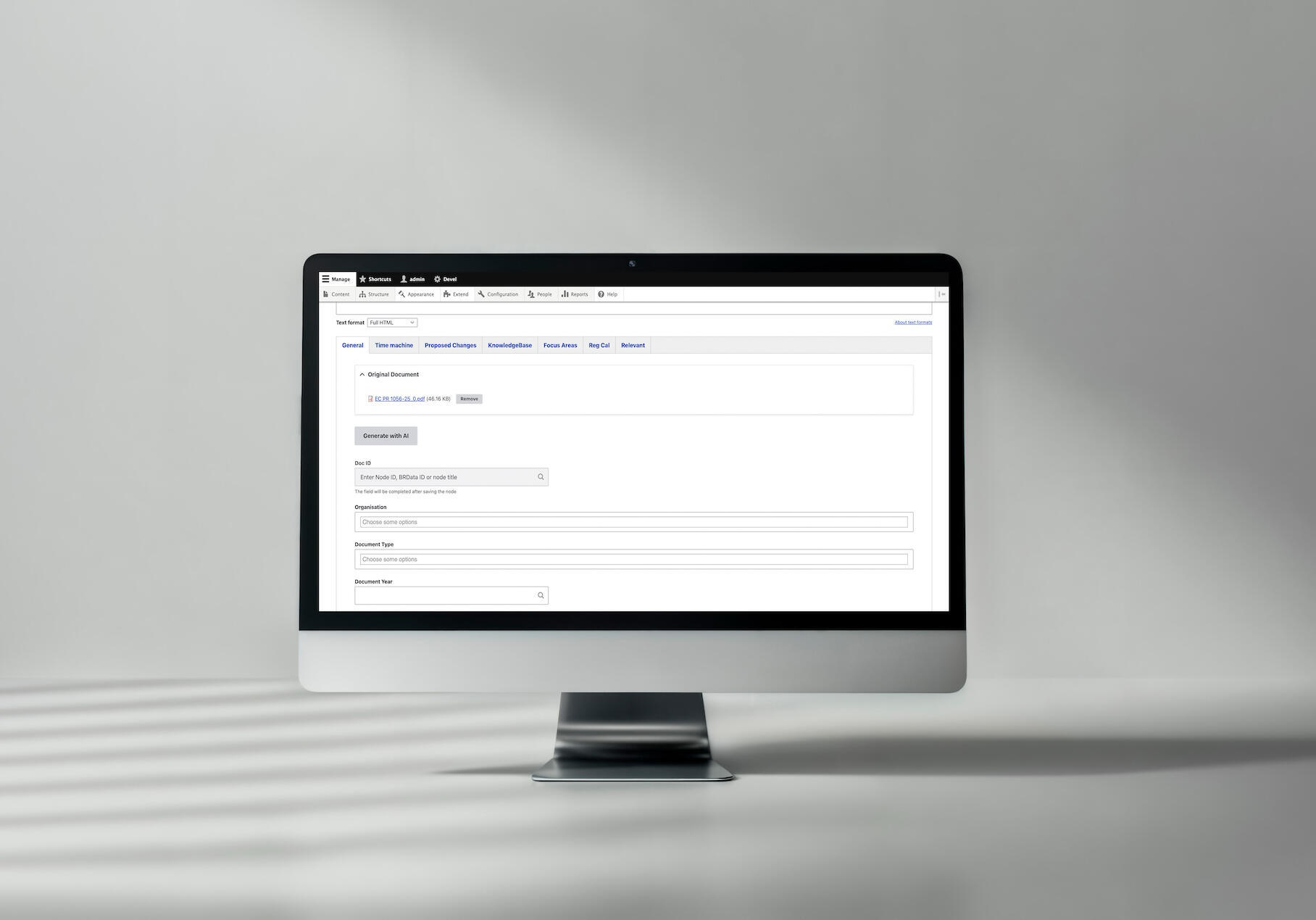
A case example of AI-based document categorization at Better Regulation
See the full AI Document Categorization case study →
How does semantic matching work for entity references?
With structured output in place, the next challenge is ensuring AI correctly maps document content to your specific taxonomy terms. This is where semantic matching—AI’s ability to understand meaning beyond exact text matches—becomes crucial.
How AI matches terms to taxonomies
The magic: AI understands meaning, not just text.
Example:
Taxonomy term: “Consumer Credit Lenders and Hirers”
Document phrases AI successfully matches:
- “consumer lending practices”
- “personal loan providers”
- “credit companies offering hire purchase”
- “firms engaged in consumer finance”
- “lenders to individuals”
How? Large language models learn semantic relationships during training. They know:
- “lending” ≈ “lenders”
- “personal loan” ≈ “consumer credit”
- “hire purchase” → “hirers”
Traditional keyword matching would fail on most of these variations.
Name-to-ID mapping mechanism
Critical design decision: AI returns taxonomy term names, which the system then maps to term IDs through Drupal’s taxonomy lookup.
Why this approach works:
// ✅ GOOD: AI returns term names
{
  "organization": ["Financial Conduct Authority"],
  "document_area": ["Data Protection", "Financial Services"]
}

// System performs taxonomy lookup
$organization_terms = \Drupal::entityQuery('taxonomy_term')
  ->condition('name', 'Financial Conduct Authority')
  ->condition('vid', 'organization')
  ->execute();

$area_terms = \Drupal::entityQuery('taxonomy_term')
  ->condition('name', ['Data Protection', 'Financial Services'], 'IN')
  ->condition('vid', 'document_area')
  ->execute();

// Map names to IDs
$organization_id = reset($organization_terms); // e.g., 23
$area_ids = array_values($area_terms); // e.g., [42, 87]

// Assign IDs to document
$node->set('field_organization', ['target_id' => $organization_id]);
$node->set('field_document_area', array_map(function($id) {
  return ['target_id' => $id];
}, $area_ids));
Benefits of the name-based approach:
- Semantic matching – AI can use its understanding to match concepts semantically, even when exact term names don’t appear in the document
- Flexibility – if taxonomy terms are renamed, the lookup still works (as long as names match)
- Clarity – term names are human-readable, making debugging and validation easier
- Precision – the lookup ensures exact matches within the taxonomy vocabulary, preventing ambiguity
How it works:
- AI returns term names based on semantic understanding of the document
- System performs taxonomy lookup to find matching term IDs
- Document fields are populated with term IDs for entity references
How to handle ambiguous terms?
Some terms genuinely ambiguous:
“ICO” could mean:
- Information Commissioner’s Office (data protection)
- Initial Coin Offering (cryptocurrency)
Strategy 1: Context clues in prompt
If document discusses data protection, "ICO" likely means "Information Commissioner's Office".
If document discusses cryptocurrency, "ICO" likely means "Initial Coin Offering".
Use document context to disambiguate.
Strategy 2: Allow multiple options
If ambiguous, return multiple possible term names:

{
  "organization": ["Information Commissioner's Office", "Initial Coin Offering"]
}
The system will look up both names and return their IDs. Human reviewer then chooses the correct one from the options.
Strategy 3: Confidence scores (advanced)
{
  "organization": [
    {"term_name": "Information Commissioner's Office", "confidence": 0.8},
    {"term_name": "Initial Coin Offering", "confidence": 0.2}
  ]
}
Select highest confidence, flag low confidence (<0.7) for review. System maps term names to IDs after selection.
Read also: AI Document Processing in Drupal: Technical Case Study with 95% Accuracy
How to optimize prompts for better accuracy?
Even with the right structure and taxonomies in place, achieving high accuracy requires continuous refinement. Here’s how to systematically improve your prompts based on real-world performance.
Iterative refinement process
Don’t expect perfect prompts on first try. Iterate.
Use actual documents, not synthetic examples.
When uncertain which approach is better, test both:
Prompt A: Concise
Categorize using these taxonomies:
[taxonomies]

Document:
[document]

Return JSON:
[schema]
Prompt B: Verbose
You are an expert legal document analyst. Your task is to carefully read
the provided document and categorize it according to the taxonomies below.

Instructions:
- Read the document thoroughly
- Identify the document type
- Determine the issuing organization
- Extract all relevant subject areas
[... detailed instructions ...]

Taxonomies:
[taxonomies]

Document:
[document]

Please return your analysis as JSON:
[schema]
How to extract legal obligations from documents?
Extracting obligations is harder than categorization because:
- Implicit obligations – not always explicitly stated
- Conditional obligations – “if X, then must Y”
- Scope identification – who must comply?
- Deadline extraction – when must compliance occur?
Identifying implicit obligations
Explicit obligation: > “All banks must submit quarterly reports to the FCA.”
Implicit obligation: > “The Authority expects quarterly reporting from regulated entities.”
“Expects” implies obligation in regulatory context.
Prompt guidance:
Extract legal obligations including:
- MUST/SHALL/REQUIRED (explicit)
- SHOULD/EXPECTED/RECOMMENDED (strong guidance, often treated as obligations)
- Implicit requirements from regulatory context

For each obligation, extract:
- What action is required
- Who must perform it (affected parties)
- When it must be done (deadline/frequency)
- What happens if not done (consequences, if stated)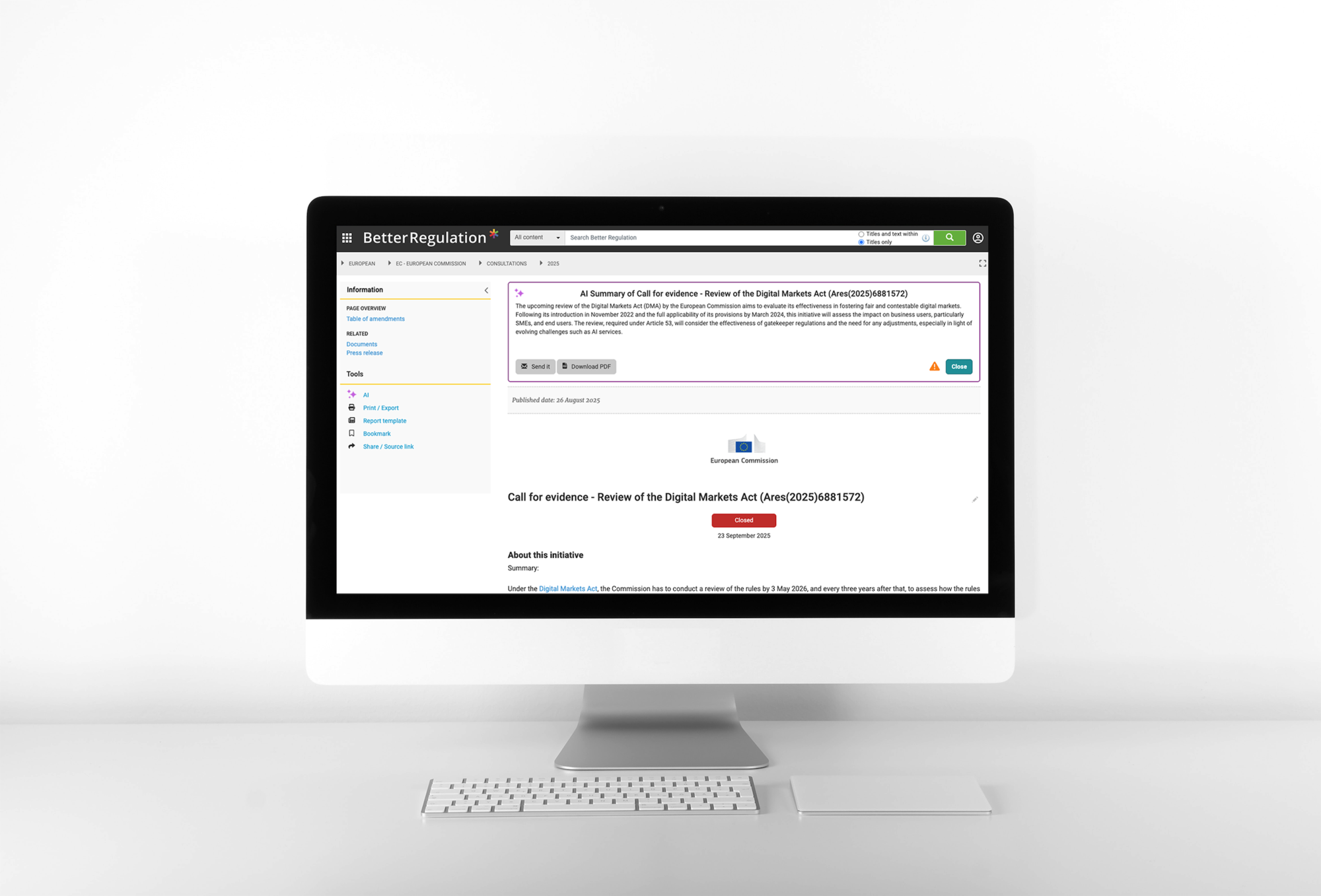
An AI-based solution for automated document summaries and obligation extraction at Better Regulation
See how we generate AI document summaries and extract obligations →
Missing information
What if document doesn’t contain expected information?
Prompt guidance:
If information cannot be determined from document:
- Return empty array [] for that field
- Do NOT guess or invent information
- Do NOT return null or undefined

Example:
{
  "source_url": ""  // Not found in document
}

NOT:
{
  "source_url": "https://www.example.com"  // Don't make up URLs
}
Multiple valid interpretations
Some documents legitimately fit multiple categories.
Example: Document discusses both banking regulation and data protection.
Prompt strategy:
document_area is a multi-value field.

If document covers multiple areas, include ALL relevant areas:

{
  "document_area": ["Banking Regulation", "Data Protection"]
}

Prefer including all relevant areas over forcing single selection.
The system will map these term names to their corresponding IDs automatically.
Read also: AI Automators in Drupal. How to Orchestrate Multi-Step AI Workflows?
Code examples and prompt templates
Now that we’ve covered the techniques, here are production-ready prompt templates you can adapt for your own legal document extraction projects. These templates incorporate all the strategies discussed above.
Complete categorization prompt
You are analyzing a UK/Ireland legal or regulatory document.

Extract and categorize using these exact taxonomies.

CRITICAL RULES:
- Use ONLY taxonomy term names from lists below (return term names as strings)
- Return valid JSON in specified format
- Match by semantic meaning, not just keywords
- If multiple terms apply, include all relevant ones
- If uncertain, return empty array []
- The system will automatically map term names to term IDs

### DOCUMENT TYPE TAXONOMY:
- Statute
- Regulation
- Guidance Note
- Code of Practice
- Case Law

### ORGANIZATION TAXONOMY:
- Financial Conduct Authority
- Bank of England
- Competition and Markets Authority
- Information Commissioner's Office
- HM Treasury
[... complete list ...]

### DOCUMENT AREA TAXONOMY:
- Banking and Finance
  - Consumer Credit
  - Banking Regulation
  - Payment Services
- Data Protection
- Competition Law
[... complete list ...]

### DOCUMENT TO ANALYZE:

{{ document_text }}

Return JSON with taxonomy term names (strings), not IDs.
Example:
{
  "document_type": ["Guidance Note"],
  "organization": ["Financial Conduct Authority"],
  "document_area": ["Consumer Credit", "Banking Regulation"]
}
Obligations extraction prompt
Extract legal obligations from this document.

An obligation is a requirement that specific parties must fulfill.

For each obligation, identify:
- What action is required
- Who must perform it (affected parties/license types)
- When (deadline or frequency)

Include:
- Explicit obligations (MUST, SHALL, REQUIRED)
- Strong guidance (SHOULD, EXPECTED, RECOMMENDED)
- Implicit requirements from regulatory context

### LICENSE TYPES:
- Consumer Credit Lenders
- Consumer Credit Hirers
- Payment Services Providers
[... complete list ...]

Return taxonomy term names (strings) for license types. The system will map these names to term IDs automatically.

### DOCUMENT:

{{ document_text }}
Prompt engineering for data extraction – conclusion
Effective prompt engineering for legal document extraction requires:
- Taxonomy injection – include complete taxonomy lists (term names only; system maps names to IDs)
- JSON schema enforcement – define exact output structure
- Semantic matching – leverage AI’s understanding of meaning
- Iterative refinement – test, measure, improve
- Error pattern analysis – fix specific mistakes systematically
- Edge case handling – plan for size limits, missing data, ambiguity
BetterRegulation’s results:
- 95%+ field accuracy
- <5% editor correction rate
- 2 months iterative improvement (75% → 95%)
- Monthly prompt refinement based on error analysis
The key lesson: Prompt engineering is not one-and-done. It’s continuous improvement based on real-world performance.
Start simple. Test thoroughly. Refine systematically. Your prompts will improve over time.
Need expert prompt engineering for your AI project?
This guide is based on our production prompt engineering work for BetterRegulation, where we developed and refined prompts over two months to achieve 95%+ accuracy in legal document extraction. The key was systematic iteration: starting with basic prompts at 75% accuracy, analyzing error patterns, refining instructions, and gradually improving to production-grade performance. This iterative approach to prompt engineering transformed a prototype into a reliable system processing thousands of documents monthly.
Building effective prompts requires both technical expertise and domain understanding. Our team specializes in prompt engineering for complex data extraction tasks. We handle the complete cycle: initial prompt design, taxonomy integration, JSON schema definition, iterative testing, error analysis, and continuous optimization. Visit our generative AI development services to discover how we can help you.