
11 Drupal Distributions that Make It Easier to Use the Features of This CMS


Did you know that you don't have to build a Drupal site from scratch? Distributions are ready-made starter kits that enable you to launch a functional website in a few hours, rather than weeks. We present 11 proven and full-featured distributions – from e-learning platforms to systems for agriculture. We created two of the distributions at Droptica.
In this article:
- What are Drupal distributions?
- What is a Drupal installation profile?
- 1. Opigno LMS
- 2. Thunder
- 3. Open Intranet
- 4. Droopler
- 5. Open Social
- 6. Varbase
- 7. Vardoc
- 8. farmOS
- 9. OpenFed
- 10. OpenCulturas
- 11. Provus
- Site building with Drupal distributions
What are Drupal distributions?
Drupal distributions are preconfigured packages containing the Drupal core and a set of modules, themes, and configurations tailored to specific applications.
In practice, a distribution consists of several elements:
- an installation profile (which defines what and how to install),
- a graphic theme,
- contributed modules,
- often also custom modules (created specifically for the distribution),
- and, increasingly, Drupal Recipes (ready-made configuration "recipes" that automatically install and set up selected features).
Distributions enable you to quickly launch a functional website without manually selecting and configuring individual components. They save time and allow you to take advantage of best practices developed by the Drupal community. Distributions are particularly useful in situations where:
- You need to quickly launch a website with specific functionality, such as an e-learning platform, e-commerce, intranet, or social network.
- You want to use ready-made solutions optimized for performance and security.
- You want easy updates and system consistency.
What is a Drupal installation profile?
A Drupal installation profile is a set of instructions that Drupal follows during the installation process. It specifies which modules to enable, what types of content to create, what roles and permissions to assign, and even what the home page should look like. Every Drupal distribution is based on an installation profile – it ensures that after installation, you get a ready-to-use system, not an empty page.
Drupal offers two basic profiles by default:
- standard – installs the most commonly used modules and creates the basic structure of the site,
- minimal – installs only the bare minimum, leaving you complete freedom to configure the content management system.
Traditional distributions, such as Varbase and Thunder, offer extensive installation profiles that include many of their own modules. We took a different approach with Droopler and Open Intranet. We built both Drupal distributions based on a very simple installation profile that imports settings from Recipes and creates a graphic theme based on proven themes: Radix (Droopler) or Barrio (Open Intranet). After installation, the profile can be disabled, and the system does not contain any custom modules that require separate updates. This approach means that after implementing Droopler or Open Intranet, their development and maintenance are similar to that of any standard Drupal site – you update the core and community modules without having to track changes in the distribution code. This model is similar to the so-called "site templates," which are set to appear on drupal.org in 2026 as a new type of project.
Can I create my own installation profile?
Yes. If you repeatedly implement similar web development projects, you can prepare your own profile that will automate repetitive configuration tasks. This is particularly useful in agencies and development teams, where standardization of implementations translates into time savings and project consistency.
1. Opigno LMS
Opigno LMS is an open source e-learning platform based on Drupal, created by Connect-i. It allows you to create, manage, and monitor online courses – from simple internal training to extensive certification programs.
Main features
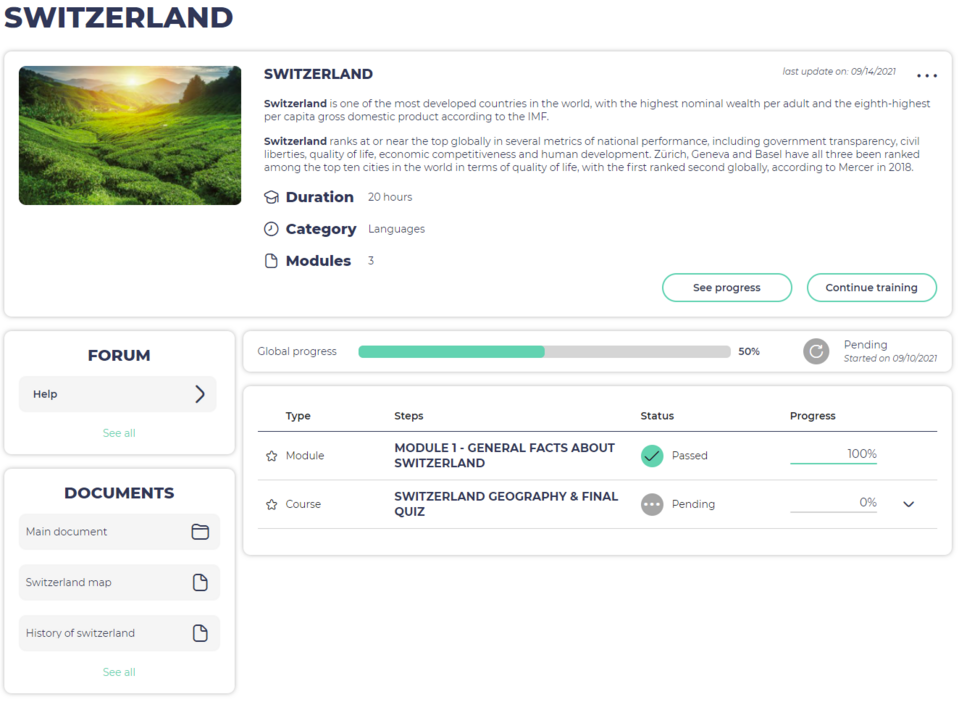
- Course design – the built-in editor allows you to create courses with modules, lessons, and quizzes. You can define adaptive learning paths where subsequent content is unlocked depending on the participant's progress.
- Interactive content – integration with H5P allows you to add interactive elements: presentations, videos with questions, educational games, and simulations.
- Certificates and badges – after completing a course, the system automatically generates certificates. You can also use badges to build gamification elements.
- User management – you can organize participants into groups and classes, assign roles and permissions, and personalize learning paths for different teams.
- Analytics and reports – detailed statistics on progress, test results, and participant engagement. You can export reports and use them to evaluate the effectiveness of training.
- Social learning – discussion forums, chat, and integration with video conferencing tools support communication between participants and trainers.
Source: Opigno LMS
Who is this distribution for?
Opigno LMS is suitable for companies conducting internal training (onboarding, compliance, competence development), educational institutions offering online courses, and non-profit organizations implementing training programs. Thanks to its open source nature and modular design, the system can be adapted to specific needs and integrated with existing infrastructure – intranet, company website, or HR system.
Demo version of Opigno LMS for the trainee
2. Thunder
Thunder is a Drupal distribution created in 2016 by German publisher Hubert Burda Media and made available as open source software. It was designed for professional editorial offices and news portals that need an efficient system for publishing large amounts of content.
Main features
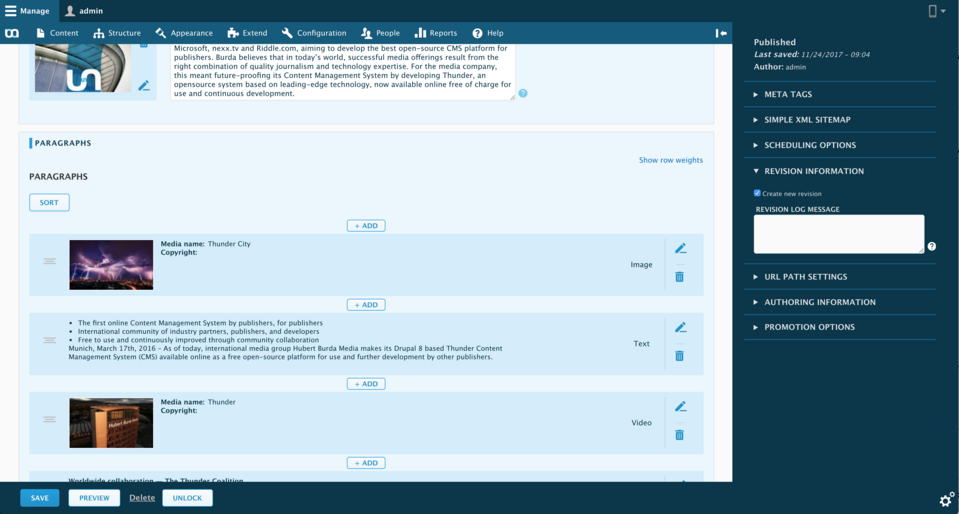
- Dynamic article creation – thanks to the Paragraphs module, editors can build articles from various elements: text, images, videos, quotes, or embedded content from social media. The order of elements can be changed using drag and drop.
- Advanced media management – the built-in media manager allows you to easily add and organize photos, galleries, and videos. The system automatically crops images and allows you to set a center point so that photos look good on any device.
- Publishing planning – you can set the date and time of publication of an article and configure automatic deletion or archiving of content after a specified period of time.
- Liveblog – a feature for reporting events live. Ideal for broadcasting conferences, sports matches, or breaking news events.
- Responsive interface – both the frontend and admin panel are fully responsive. Editors can preview how an article will look on different devices before publication.
- Integration with AMP and Instant Articles – support for Google AMP (Accelerated Mobile Pages) and Facebook Instant Articles ensures instant content loading on mobile devices and better visibility on social media.
- SEO and analytics – Thunder includes tools for search engine optimization and integrations with analytics systems that help track article popularity.
Source: GitHub
Who is this distribution for?
Thunder is the choice for newsrooms, online magazines, news portals, and publishers who publish a lot of content and need tools to streamline the work of their editorial team. The distribution is developed by a community of publishers, which means that new functions respond to the real needs of the media industry.
3. Open Intranet
Open Intranet is a free, open-source intranet system based on Drupal 11, created by our team at Droptica. It was designed for companies that need a central place for internal communication, knowledge sharing, and collaboration—without license fees or dependence on external providers.
Main features
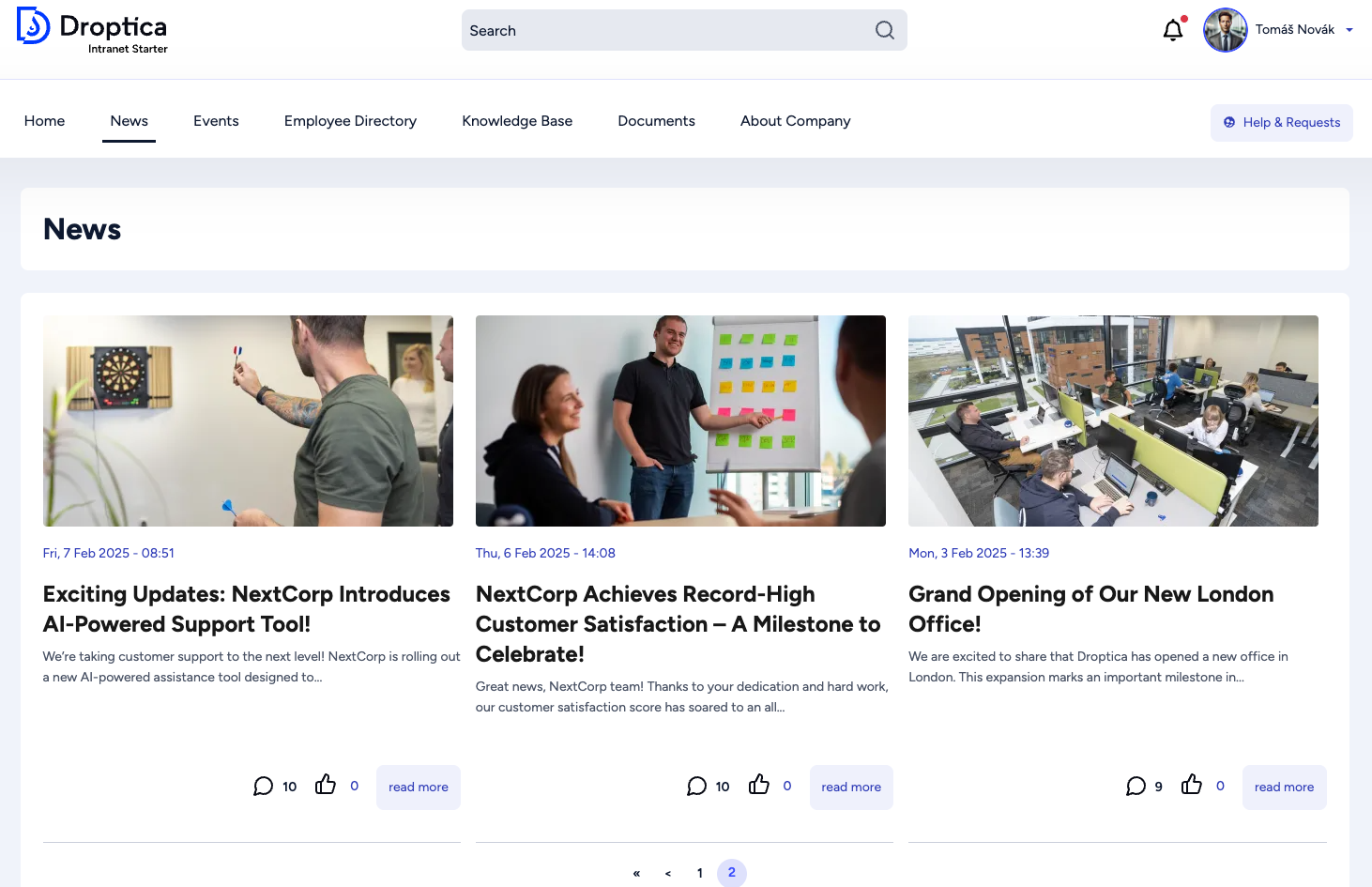
- Internal communication – employees can publish short posts (similar to those on social media), longer articles on the company blog, and announcements visible to the entire organization or selected departments.
- Document management – a central file repository with version control and access permissions. Employees can quickly find regulations, procedures, templates, and other company materials.
- Electronic forms – vacation requests, IT requests, administrative requests, employee surveys – all in one place. The system automatically directs requests to the appropriate people and tracks their status.
- Employee directory – profiles with contact details, photos, and department information. Filtering by office, team, or position makes it easy to find the right person.
- Organizational structure – visualization of supervisor-subordinate relationships and division into departments. New employees will quickly figure out who's who in the company.
- Smart search – a dynamic search engine with suggestions and results divided into categories (articles, documents, people). No more digging through dozens of folders.
- Responsive design – the interface automatically adapts to the screen size. Employees can use the intranet on a computer in the office, a tablet during a meeting, or a smartphone in the field – always with full access to features and a clear content layout.
- AI support – built-in artificial intelligence tools help editors generate content suggestions for announcements and articles, reducing the time needed to prepare internal communications.
- Integrations – Open Intranet works with Active Directory, LDAP, Google Workspace, and Microsoft 365. Employees log in with a single company account, and user data is synchronized automatically.
Who is this distribution for?
Open Intranet is suitable for companies of all sizes – from teams of a dozen or so people to organizations employing hundreds of employees. It is particularly useful where information is scattered across emails, instant messengers, and network drives, and employees waste time searching for documents and the right people to contact. Thanks to the open source code, you have full control over the system – you can host it on your own servers or in the cloud, adapt it to your processes, and integrate it with other tools. If you need support with intranet implementation, configuration, or development of additional features, our team at Droptica will be happy to help.
4. Droopler
Droopler is a Drupal distribution created by our team at Droptica that allows you to quickly build professional websites from ready-made components. Instead of creating each page from scratch, the editor selects the necessary elements and arranges them like building blocks – without any programming knowledge.
Main features
- Intuitive page builder – the heart of Droopler is a system of paragraphs (components) that can be freely arranged on the page using the drag and drop method. The editor adds components, fills them with content, and immediately sees the effect.
- Extensive component library – there are several ready-made blocks available: banners with background images, text + photo sections, galleries, carousels, contact forms, counters, article previews, embedded maps and videos, and many more. Each component can be used multiple times on different subpages.
- Full control over the appearance – each component has settings for margins, spacing, color scheme (light/dark), and HTML tags (h1-h5). You can also add your own CSS classes for advanced customization.
- News section – a built-in news publishing mechanism with listings, categories, and previews. Ideal for a company blog or news section.
- Forms – integration with the Webform module allows you to create any forms (contact, inquiries, surveys) and embed them anywhere on the site.
- SEO optimization – Droopler is prepared for website positioning – it has an automatically generated sitemap, meta tags with the option of manual overwriting, correct header tags, alt tags on images, and a readable HTML structure for search engine robots.
- Performance – Websites built on Droopler achieve high Google PageSpeed scores on both desktop and mobile devices.
- Responsive design – all components automatically adjust to the screen size. The website looks good on a computer, tablet, and smartphone.
- Extensibility – if you need a feature that is not included in the standard package, you can commission the addition of your own components or add any Drupal modules.
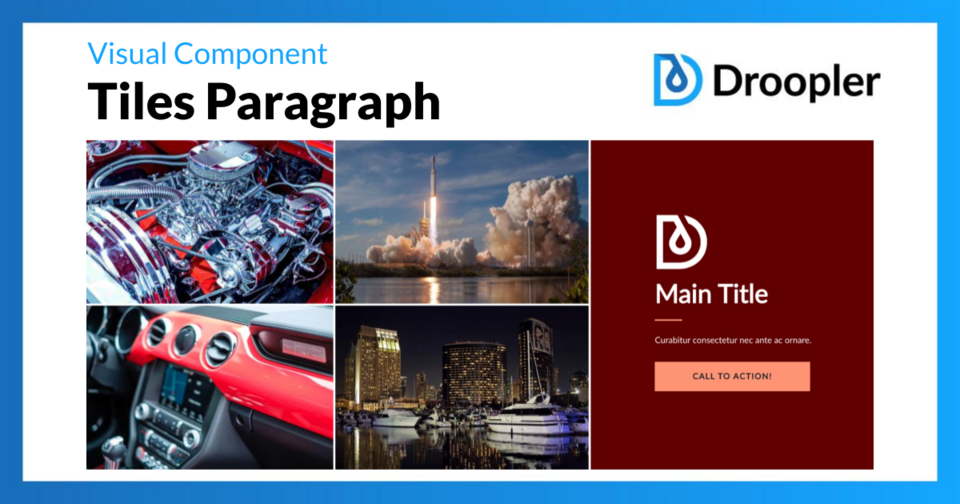
Choosing the right paragraph depends on your own vision and idea of the website layout
Who is this distribution for?
Droopler is perfect for building company websites, landing pages, product websites, and service websites. It is ideal for companies that want to quickly launch a professional website and be responsible for content management themselves, without involving developers for every change. Distribution is available free of charge as open source.
Source: Droopler demo
5. Open Social
Open Social is a Drupal distribution designed for building online communities, intranets, and collaboration platforms. If you need a place where people can meet, discuss, and collaborate, Open Social provides you with ready-made tools.
Main features
- User profiles – each community member has their own profile with contact information, photo, description, and activity list. Users can follow each other and build a network of contacts.
- Groups – create thematic groups (open, closed, or secret) where users can discuss, share files, and collaborate on projects. Each group has its own board, events, and documents.
- Events – organize online and offline meetings with the ability to register participants, send reminders, and manage guest lists. Integration with Zoom and BigBlueButton allows you to conduct video conferences directly from the platform.
- Activity stream – a central board shows the latest posts, comments, and activities in the community. Users can see what's happening in the groups they follow and react to content.
- Notification system – email and in-app notifications inform users about new messages, comments, group invitations, and upcoming events.
- Private messages – community members can communicate directly without sharing conversations publicly.
- Content moderation – tools for administrators to manage users, moderate posts, and respond to reports of violations.
- Responsive design – the platform works seamlessly on computers, tablets, and smartphones, making it easy to access the community from anywhere.
Who is this distribution for?
Open Social is ideal for non-profit organizations building communities around their mission, companies creating internal collaboration platforms, associations and interest groups, as well as public institutions that need a channel of communication with citizens.
6. Varbase
Varbase is a comprehensive starter kit for Drupal, created by Vardot. It includes over 100 preconfigured functions that, according to the developers, save over 200 hours of work when setting up a new project. Instead of installing and configuring the same modules every time, you get a ready-made base that complies with best practices.
Main features
- Rich starter kit – Varbase provides configured content types, user roles, permissions, a WYSIWYG editor, and a media management system.
- AI integration – optional AI-based tools help you generate content, optimize images, and automatically tag materials. Useful for managing large amounts of content.
- Advanced SEO – built-in Metatag, Simple XML Sitemap, and Redirect modules, as well as integration with Google Analytics and Real-time SEO (Yoast), help optimize your website's visibility in search engines.
- Media management – an extensive media library with drag-and-drop support, automatic image cropping, responsive graphic styles, and support for various file formats.
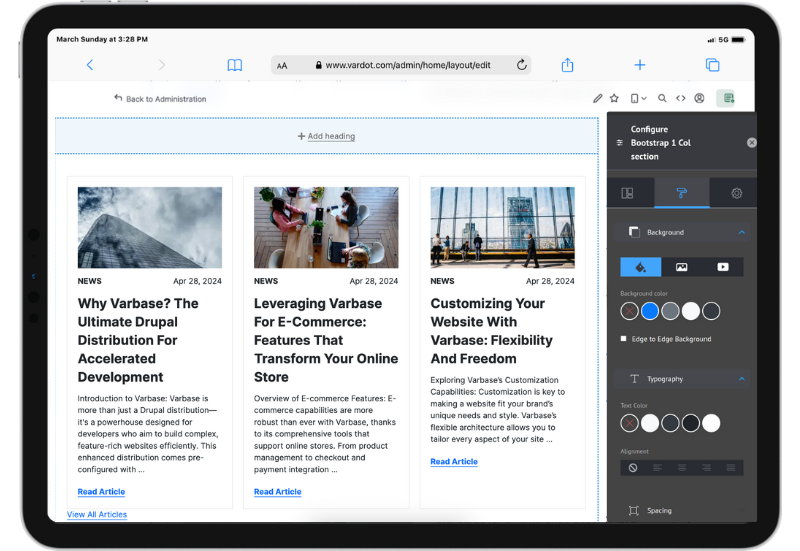
- Layout Builder – a visual page layout editor allows editors to create and modify templates without interfering with the code. You can build unique layouts for individual subpages.
- WYSIWYG editor – an advanced content editor with inline editing, live preview, and easy media embedding. Editors can see the results of their work in real time.
- Responsive design – a Bootstrap 5-based theme ensures that the site displays correctly on all devices. You can customize it to match your visual identity or replace it with your own theme.
Source: drupal.org
Who is this distribution for?
Varbase is suitable for medium and large projects where a quick start, scalability, and compliance with standards are important. It is particularly popular in the education, healthcare, public administration, and media sectors. If you regularly launch new projects on Drupal and want a solid, proven foundation, Varbase will significantly speed up your work.
7. Vardoc
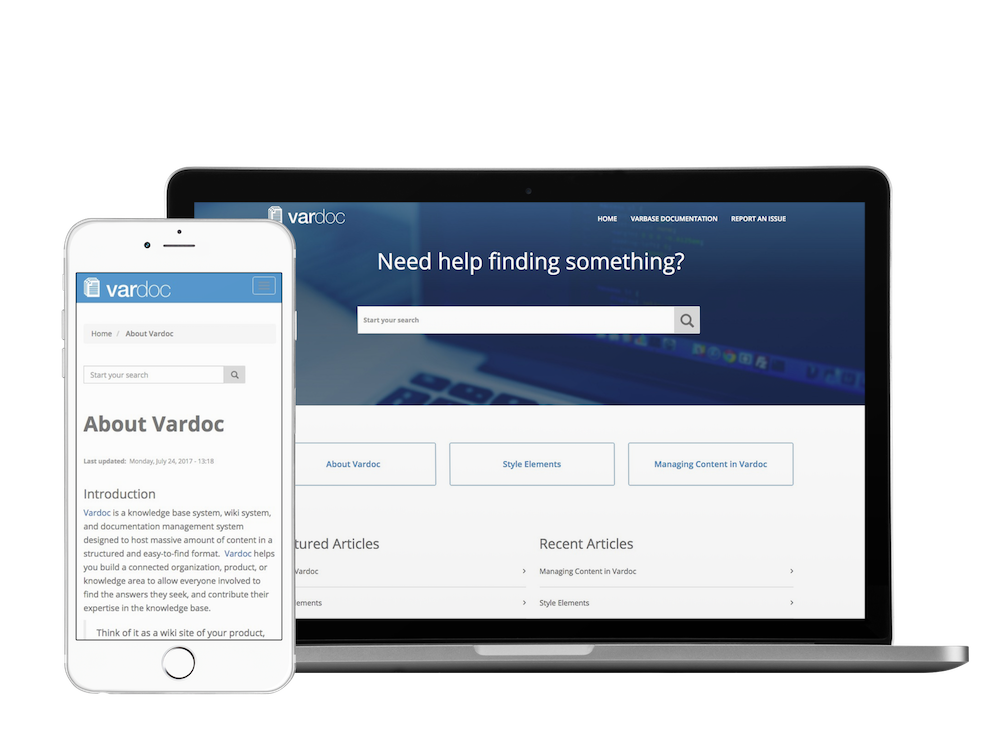
Vardoc is another Drupal distribution created by Vardot, designed for building knowledge bases, wiki systems, and documentation sites. It is based on the Varbase distribution, inheriting its solid foundations—SEO tools, security, and scalability—while adding features specific to documentation management.
Main features
- Hierarchical content structure – you can organize documentation into categories, subcategories, and chapters. Users can easily navigate the table of contents and quickly find the information they need. The structure resembles a book with chapters and subchapters.
- Wiki features – authorized users can collaborate to create and edit content. The change history allows you to track who made modifications and when, and restore a previous version if necessary.
- Advanced search – a fast search engine with suggestions and filtering of results by category. Users find answers without having to dig through dozens of pages.
- Taxonomy and tagging – a system of tags and categories facilitates content organization and the creation of links between documents. Related articles are displayed automatically.
- Intuitive editor – an advanced WYSIWYG editor allows you to format text, add images, tables, and code blocks without knowing HTML. Editors see the results of their work in real time.
- SEO optimization – thanks to integration with Varbase, documentation is well indexed by search engines. Automatic meta tags, friendly URLs, and a sitemap help users find your content on Google.
- Responsive design – documentation displays correctly on computers, tablets, and smartphones. Users can access the knowledge base from any device.
Source: drupal.org
Who is this distribution for?
Vardoc is ideal for technology companies that create product and API documentation. It will also be very useful for organizations building internal knowledge bases for employees, open source projects that need clear documentation for users and developers, and educational institutions that publish teaching materials.
8. farmOS
FarmOS is a web-based farm management application built on the Drupal platform. It enables planning, monitoring, and documentation of all aspects of agricultural activity—from crops and livestock to equipment and soil testing. The system is developed by the open source community and tailored to the needs of both small family farms and large commercial farms.
Main features
- Area management – define fields, plots, pastures, greenhouses, and other areas of the farm. You can mark each area on the map and assign crops, animals, or planned activities to it.
- Maps and GIS integration – built-in mapping tools allow you to visualize your farm from a bird's eye view. You can import GPS data, draw field boundaries, and analyze resource distribution.
- Crop records – record the entire crop life cycle: sowing, transplanting, fertilizing, spraying, irrigating, and harvesting. The history of each crop is available in one place.
- Animal management – keep records of your herd: births, movements, feeding, veterinary treatment, and sales. You can track individual animals or groups.
- Soil testing and sensors – record soil test results and monitor environmental conditions. farmOS integrates with temperature and humidity sensors and other IoT devices.
- Activity log – every operation on the farm can be recorded as a log: field work, protective treatments, equipment repairs, weather observations. Logs can be tagged, filtered, and searched.
- Support for organic farming – the farmOS Organic module allows you to mark resources and activities as "organic," "non-organic," or "in conversion." This facilitates the documentation required for certification.
- Mobile app – farmOS Field Kit allows you to enter data in the field, even without internet access. Data is automatically synchronized when connected to the network. Available on Android and iOS.

Source: farmOS
Who is this distribution for?
farmOS is suitable for farmers of all sizes and specializations, from vegetable and fruit growing to cattle breeding and milk production. It is also used by agricultural researchers, organizations supporting sustainable agriculture, and agrotechnical consulting companies.
9. OpenFed
OpenFed is a multilingual Drupal distribution created by the Belgian Federal Public Service Policy and Support (BOSA) as part of the Fast2Web initiative. It was designed for public institutions that need a platform compliant with European regulations and accessibility standards.
Main features
- WCAG compliance – OpenFed places particular emphasis on digital accessibility. The interface and generated pages comply with WCAG guidelines, making them user-friendly for people with various disabilities who use screen readers, keyboard navigation, or text magnification.
- GDPR compliance – built-in tools support compliance with European regulations on personal data protection. The system facilitates the management of user consents, privacy policies, and data processing.
- Multilingualism – full support for websites in multiple languages, which is crucial for institutions operating in multilingual countries (such as Belgium) or internationally. The administration interface and content can be translated independently.
- Predefined content types – ready-made structures for typical public sector needs: information pages, news, events, meetings, job offers, downloadable documents. All this speeds up the launch of a new website.
- Advanced search – integration with Apache Solr ensures fast and accurate search results. Autocomplete, filtering, and searching in attachments (PDF, Word) make it easier for users to find the information they need.
- CKEditor – an intuitive WYSIWYG editor allows editors to format content without knowing HTML. Tables, lists, quotes, and multimedia can be embedded.
- Security modules – the distribution includes a package of modules that enhance security: Secure Login (HTTPS enforcement), Security Kit (security headers), Username Enumeration Prevention (protection against user enumeration). Security is a priority in the public sector.
- Flexible layout customization – Display Suite, Field Group, and Weight modules allow you to customize the appearance of pages without interfering with the code. Administrators can create different layouts for different types of content.
- Form support – create contact forms, surveys, and requests for citizens. Data is processed in accordance with GDPR requirements.
Who is this distribution for?
OpenFed is primarily intended for government institutions, public administration offices, local government units, and international organizations operating in Europe. It is suitable for use wherever compliance with EU regulations, a high level of accessibility, and support for multiple official languages are required. The distribution is available free of charge as open source and is actively developed by the BOSA team and the Drupal community.
10. OpenCulturas
OpenCulturas is a Drupal distribution designed for cultural and artistic communities. It enables the creation of portals promoting local cultural life – events, artists, places, and initiatives. The project is developed by the non-profit association OpenCulturas e.V., which ensures the democratic development of the platform.
Main features
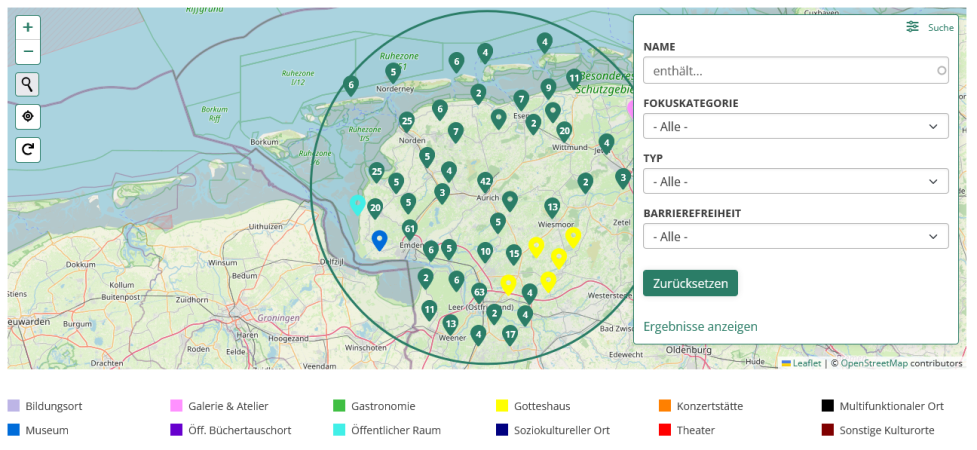
- Events calendar – the central element of the portal. Users can browse upcoming concerts, exhibitions, performances, and workshops in a calendar view with filtering by category, date, and location. Events are also displayed on an interactive map.
- Locations on the map – create profiles of cultural venues: theaters, galleries, clubs, museums, cultural centers. Each location is marked on the map and includes contact information, a description, and a list of related events.
- Artist and group profiles – artists, bands, theater groups, and art collectives can have their own profiles with biographies, photos, links to social media, and a list of upcoming performances.
- Cultural magazine – an editorial section for articles, interviews, reviews, and reports. It allows you to build a narrative around the local cultural scene and promote selected artists.
- Cyclical events catalog – contains descriptions of workshops, courses, and recurring events and allows you to search for them using filters.
- Multidimensional tagging – each tag (music genre, art type, district) automatically generates its own landing page. This facilitates navigation and promotion of individual cultural categories.
- Responsive design – the portal works smoothly on computers, tablets, and smartphones. Users can browse events and buy tickets from any device.
Source: OpenCulturas
Who is this distribution for?
OpenCulturas is ideal for cities and regions that want to create a shared cultural portal, cultural centers, museums, and galleries promoting their offerings, artistic associations and non-profit organizations working for culture, as well as festivals and recurring events that need an information platform.
11. Provus
Provus is a Drupal distribution created by the American company Promet Source, designed for easy website building by people without programming knowledge. It is based on Drupal's Layout Builder and offers a library of ready-made components that can be arranged using drag and drop.
Main features
- Component library – Provus provides a set of predefined blocks: banners, accordions, tabs, cards, statistics with numbers, calls to action (CTA), galleries, lists, and many more. Each component can be configured without editing the code.
- Integration with Layout Builder – a visual layout editor allows editors to build unique page templates. You can create different layouts for the home page, subpages, articles, or landing pages – all in an intuitive interface.
- Built-in features – the distribution includes ready-made modules for common needs: event calendar, news and blog section, employee directory with profiles, FAQ section, alerts and messages on the website, contact forms.
- Modular installation – during implementation, you only select the features you need. You can disable unnecessary additional modules and add new ones at any time via the administration panel.
- Bootstrap-based theme – Provus uses Bootstrap Barrio as its base theme, which ensures responsiveness and easy customization of the appearance. You can override CSS variables (colors, fonts, breakpoints) without modifying the main files.
- Editing without coding – editors and marketers can independently create new subpages, change the layout, and update content. Developers are only needed for advanced customizations.
Who is this distribution for?
Provus is ideal for organizations that want to give their marketing teams and editors independence in managing their website without constantly involving the IT department. This distribution is popular among public institutions, local governments (there is a Provus®Gov variant), non-profit organizations, and medium-sized companies.
Site building with Drupal distributions
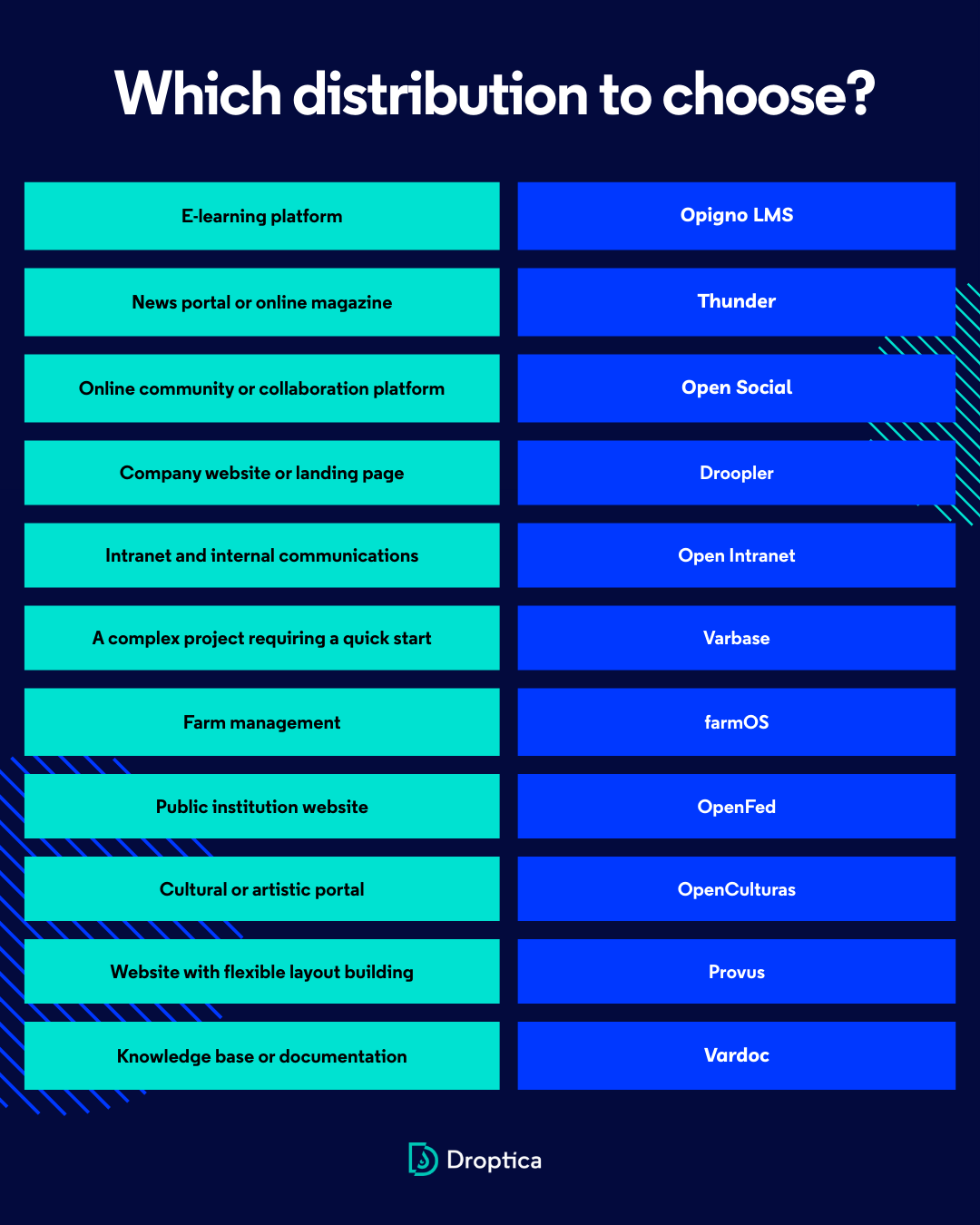
Drupal distributions are a proven way to speed up website implementation and take advantage of ready-made solutions tailored to specific business needs. Instead of building everything from scratch, you get a solid base with preconfigured modules, themes, and settings—and then customize it to your project.
Distribution capabilities
Distribution is a starting point, not a limitation. You can freely expand, modify, and integrate each of them with other systems – you retain the full flexibility of Drupal. If you need support in choosing a distribution, implementation, or development of additional features, we will be happy to help you choose a solution tailored to your needs as part of our Drupal development services.
***
Updated article dated 28/02/2024